How to Create an AI Virtual Influencer: Build a Character with PixPix and Consistently Produce Content
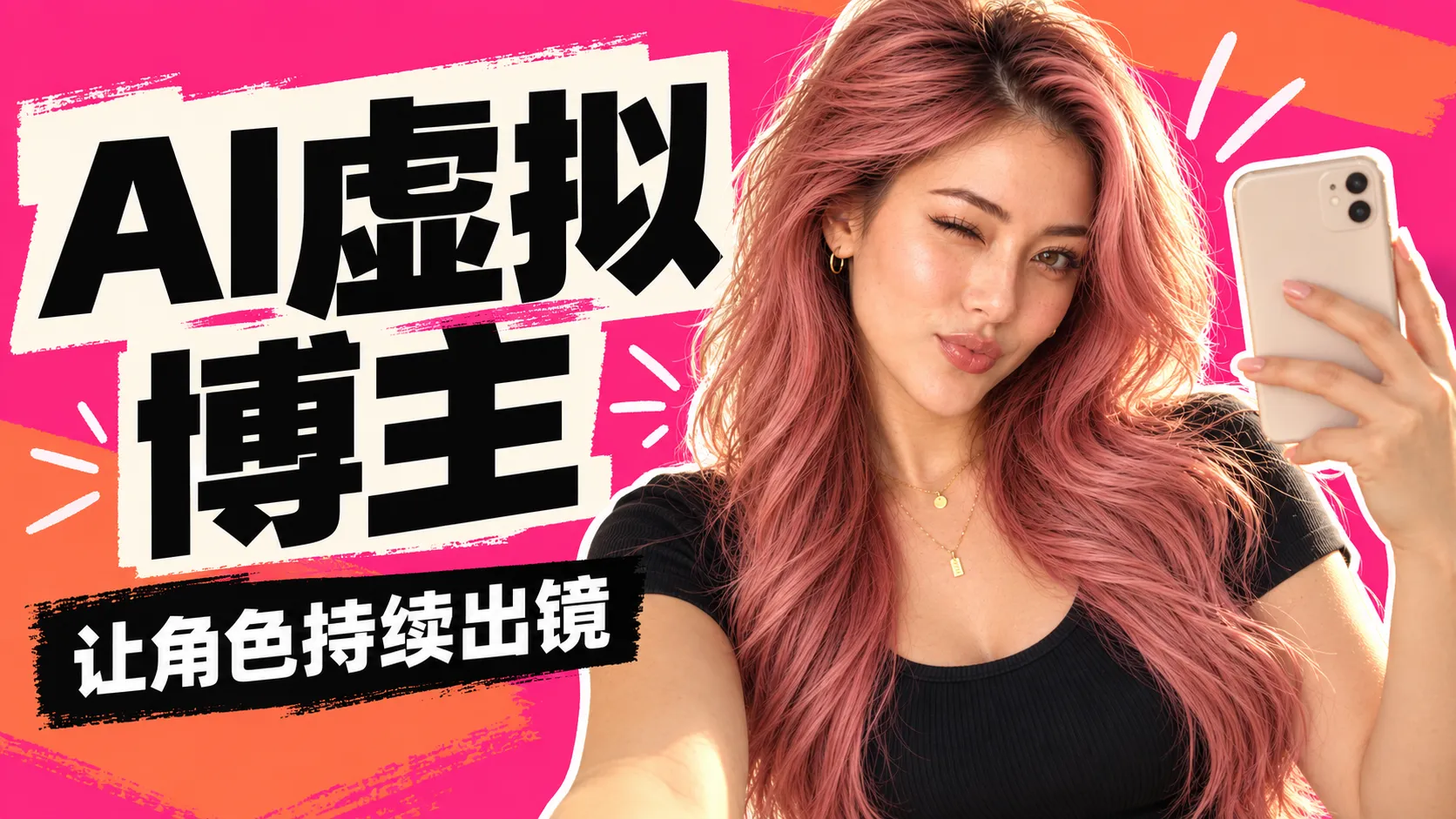
How do you create an AI virtual blogger? You need to solve two problems simultaneously: ensuring each image recognizes the same person, while also giving each piece of content distinct expressions, movements, and glimpses of daily life. Simply placing the same face against different backgrounds only addresses part of the challenge.
This article uses the original fictional character “Mira” as an example to demonstrate how to build a personalized character reference in PixPix, extending it to fitness selfies, balcony moments, and restaurant snapshots, and then preparing a starting frame for a selfie video. The five prompt templates provided are original, versatile, and can be adjusted according to your needs.
First, define the character’s personality and content direction.
An AI virtual blogger is an account centered around a synthesized character that consistently shares a specific type of content. Before creating such a character, clearly outline what she will share and how she will interact with the camera.
Mira is positioned as a vibrant, confident, and slightly playful adult lifestyle character. Her content revolves around daily workouts, personal outfits, and snippets of her days off; posing for selfies, playfully tossing her hair, turning slightly to the side, and flashing natural smiles can all serve as ways to express her unique personality.
The teaching character in this article is set up as follows:
Name and Identity: Mira, 26 years old, an original fictional adult lifestyle blogger.
Content Direction: Fitness selfies in front of a mirror, relaxing on the balcony, and everyday scenes at restaurants.
Facial Anchor Points: A slightly elongated oval face, hazel-brown eyes, and corresponding proportions between eyebrows, eyes, nose, and lips.
Hairstyle: Rose-pink long hair reaching below the chest, parted to one side, styled in loose waves.
Makeup and Styling: Defined eyeliner and lashes, warm-toned contouring, highlighted cheekbones, and glossy lip color.
Accessories and Main Outfit: Small golden hoop earrings, two delicate layered necklaces, a black ribbed tank top, and denim jeans.
Camera Presence: Raised eyebrows, slightly pouting lips, hand gently tucking hair, natural smiles; adjusting poses and shooting distances depending on the scene.
Age and appearance should be used to maintain consistency within the character’s persona and must not resemble the biography of a real person. The introduction can simply state: “An original AI virtual character sharing inspiration for exercise, fashion, and leisurely days off.”
Building Reusable Character References in PixPix
PixPix Image Generation Entry allows users to input text or reference images, and explicitly states in public prompts that uploaded content can be referenced via @. You can first create a character using text, then upload selected reference images to expand the content further.
Here, the “character master template” refers to reference images you personally select and save. Naming the character makes organizing materials easier, and subsequent generations still require providing both images and specific retention requirements.
Use clear selfie samples to establish the character’s style.
The master template can come from a selfie taken in a setting. The key is having clear facial features, visible eyes, recognizable hairstyle, and no phone obstructing the face. The body can be slightly turned to the side, and the expression can reflect individuality—there’s no need to stick to a single frontal pose across all shots.
Mira’s first image features a black tank top, warm window lighting, and a selfie taken in front of a mirror, clearly showing her face and long hair while also indicating the makeup style and overall vibe of this series. A 4:5 aspect ratio can serve as a starting point for vertical compositions, though the actual output options depend on your current workspace.
Original Universal Template 1: Selfie-Based Character Master Template
创作原创虚构的 26 岁成年女性 Mira,偏长鹅蛋脸、榛棕色眼睛、自然浓眉,玫瑰粉长发至胸下,偏侧分、松散波浪。
妆容有清晰眼线、睫毛、暖调修容、颧骨高光和亮泽唇妆,保留可辨的五官与真实皮肤细节。
穿黑色修身罗纹背心与蓝色牛仔裤,佩戴小金色圆环耳饰和两条纤细项链。
在有下午窗光的公寓镜前自拍,一手举无品牌手机放在脸侧,另一只手轻拢头发。
身体微侧转、重心自然偏向一侧,轻挑眉、轻嘟嘴,双眼清楚,面部不被手机遮挡。
竖版近距离手机照片,构图略有倾斜,手部、手机与镜面透视合理,无画面文字或品牌标识。
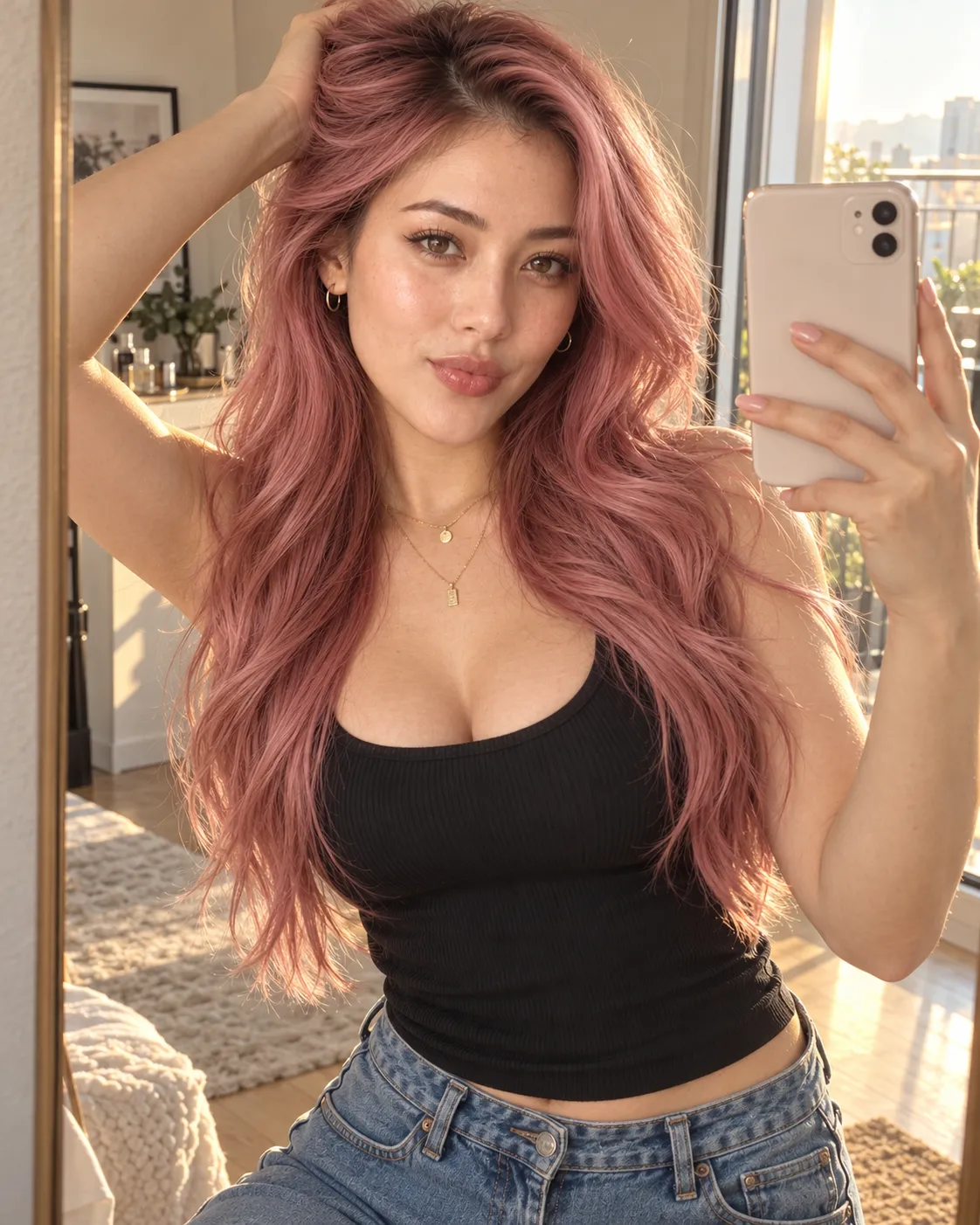
Caption: A selfie sample simultaneously establishes both the character’s identity and makeup direction. With clear facial features and no phone blocking the face, it becomes much easier later on to compare changes in expression and scene.
Separate checks for character identity and camera presence.
Facial proportions, perceived age, eye shape, hair color, hair length, and parting are the identity verification criteria for this case. Expressions, gestures, clothing, and shooting position may vary depending on the content.
Do not interpret stable identity as always maintaining the same smile. A side-profile selfie, a seated pose with hair play, or a smile during a meal can all belong to the same persona; what matters is whether the eyebrows, eyes, nose, lips, and jaw still correspond after changes in expression.
At the beginning, start by keeping the subject and outfit unchanged, verify one new scene, then gradually add outfit changes or hand gestures. This way, if deviations occur, it’s easier to pinpoint the cause.
Create distinct life snippets using three different scenes.
Reopen the image generation interface, upload a character reference, and clearly indicate in the prompt that it is responsible for identity verification. If using @ mentions, select the actual uploaded reference material; do not simply list a character’s name.
The following three templates define scene, pose, and shooting style, respectively. During actual production, generate and review each image individually, continuously reusing the same master template. If the current mode does not support reference images, first choose a mode that allows image input.
Fitness selfie: Include your phone and body posture within the frame.
Original General Template 2: Gym Selfie in Front of the Mirror
以上传的 Mira 自拍样张为人物身份参考,保留同一人的脸、年龄、榛棕色眼睛、玫瑰粉长发、偏侧分与金色配饰。
换成灰绿色短袖运动上衣与同色高腰长运动裤,在明亮健身房镜前拍照。
一手举无品牌浅色手机放在脸侧,另一只手自然停在腰部,重心放在一条腿上,肩部轻微侧转。
轻挑眉、带一点俏皮笑意,头部至大腿上部中景,机位略有倾斜。
手机不遮住五官,镜中手臂、手机和身体的反射关系合理,窗光与人物阴影一致。
不安排器械操作,不生成品牌标识、可读招牌或额外人物。
This content can revolve around “Today’s Workout Look.” Simply holding up your phone and turning your shoulder already creates variation; for initial testing, there’s no need to simultaneously add walking, waving, or equipment‑related movements.
Balcony Routine: Use sitting posture and framing distance to change the rhythm.
Original General Template 3: Balcony Sitting Pose with Hair Play
以上传的人物参考为身份依据,保留同一人的面部比例、眼形、玫瑰粉长发和偏侧分。
穿白色圆领 T 恤和蓝色长牛仔裤,在有阳光的公寓阳台椅上自然坐直。
身体与镜头形成轻微侧角,一手轻扫肩上的头发,另一只手放在椅子扶手上,自然看向镜头微笑。
采用比自拍更宽的手机照片构图,带出阳台栏杆与城市背景。
保留清楚的面部,头发与手部接触自然,座椅、身体和阴影的空间关系一致,无品牌标识或画面文字。
Sitting posture, hair‑playing, and slightly wider framing give the content a different rhythm. The face should remain clearly recognizable; do not rely on large areas of hair to mask identity discrepancies.
Restaurant Snapshots: Replace Repetitive Poses with Natural Reactions.
Original General Template 4: Everyday Restaurant Snapshots
以上传的 Mira 人物参考为身份依据,保留同一人的五官、年龄、长粉发、分线和金色配饰。
穿黑色短袖圆领上衣,在暖光餐厅桌旁自然坐着,桌上有一小份草莓蛋糕。
她看向镜头旁边,露出自然笑容,一手松握餐叉停在盘子上方,餐叉与脸部保持距离。
采用较近的上半身手机抓拍构图,轻微不对称,保留自然表情变化。
手指与餐叉结构清楚,盘子和食物落在桌面上,面部受光与室内环境协调,不生成品牌或店名文字。
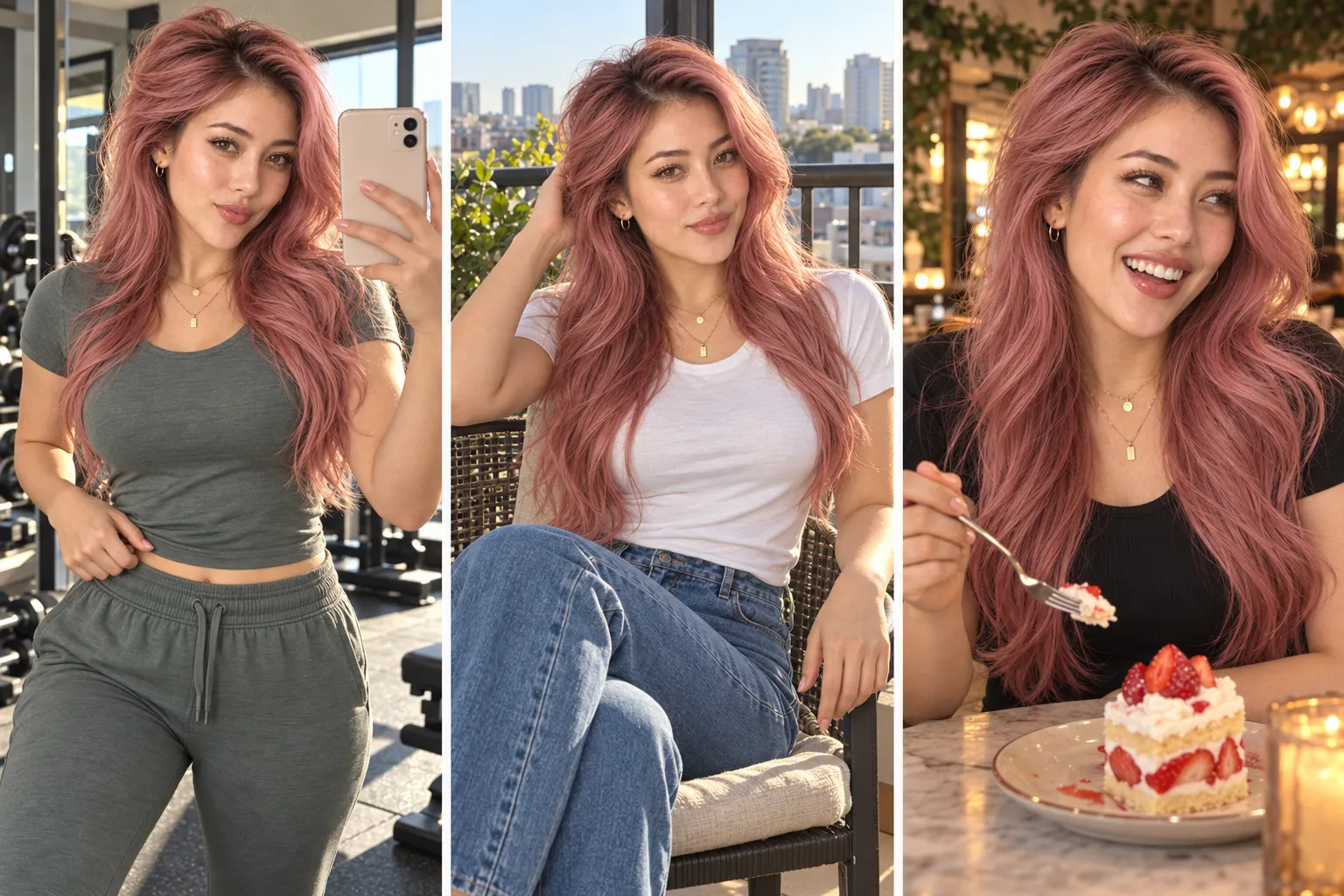
Caption: The three scenes alter posture, expression, camera angle, and framing distance. When comparing finished shots, simultaneously check the subject’s identity, hand structure, and ambient lighting.
Organize the visuals into a column that can be continuously updated.
For each column, first clarify a specific content issue, then decide on the subject’s actions and accompanying text. Fitness selfies focus on styling and current condition, balcony routines emphasize the relaxed atmosphere of a day off, while restaurant snapshots capture natural reactions.
Below is a set of suggested initial scheduling guidelines for assigning production tasks; these do not represent the platform’s recommended posting frequency.
Sequence | Content Task | Questions This Entry Needs to Answer | Production Focus |
|---|---|---|---|
First Item | Character Selfie Introduction | Who is Mira, and what will she share? | Character Identity, Makeup, and Expression Habits |
Second Item | Fitness Selfie in Front of the Mirror | How does this content reflect the character’s athletic style? | Phone reflection, shoulder turn pose, and facial expressions |
Article Three | Balcony rest day | How can you create a relaxed, unhurried rhythm in your shots? | Seated posture, hair‑tossing, and wider framing |
Article Four | Short selfie video with gentle movements | How can you make the same expression appear naturally animated? | Clear opening shot and a single action |
Text should also connect with the visuals. For example: “Raise your phone slightly, switch which shoulder faces the camera, and that same black tank top takes on a whole new vibe.” Rather than repeating vague emotional captions for every image, this approach better conveys the character’s perspective.
When using composite scenes, you can call it a “dynamic selfie styling” or a “rest-day scene practice,” avoiding packaging fictional locations, store visits, or product experiences as genuine records.
Start making short videos with one clear selfie
PixPix AI Video Creation Guide explains how to generate dynamic footage from images or creative descriptions. After entering the video generation portal, select the mode that supports image references, upload an approved standalone selfie, then describe a simple motion. Duration, aspect ratio, and audio settings will follow the actual options of the currently selected model.
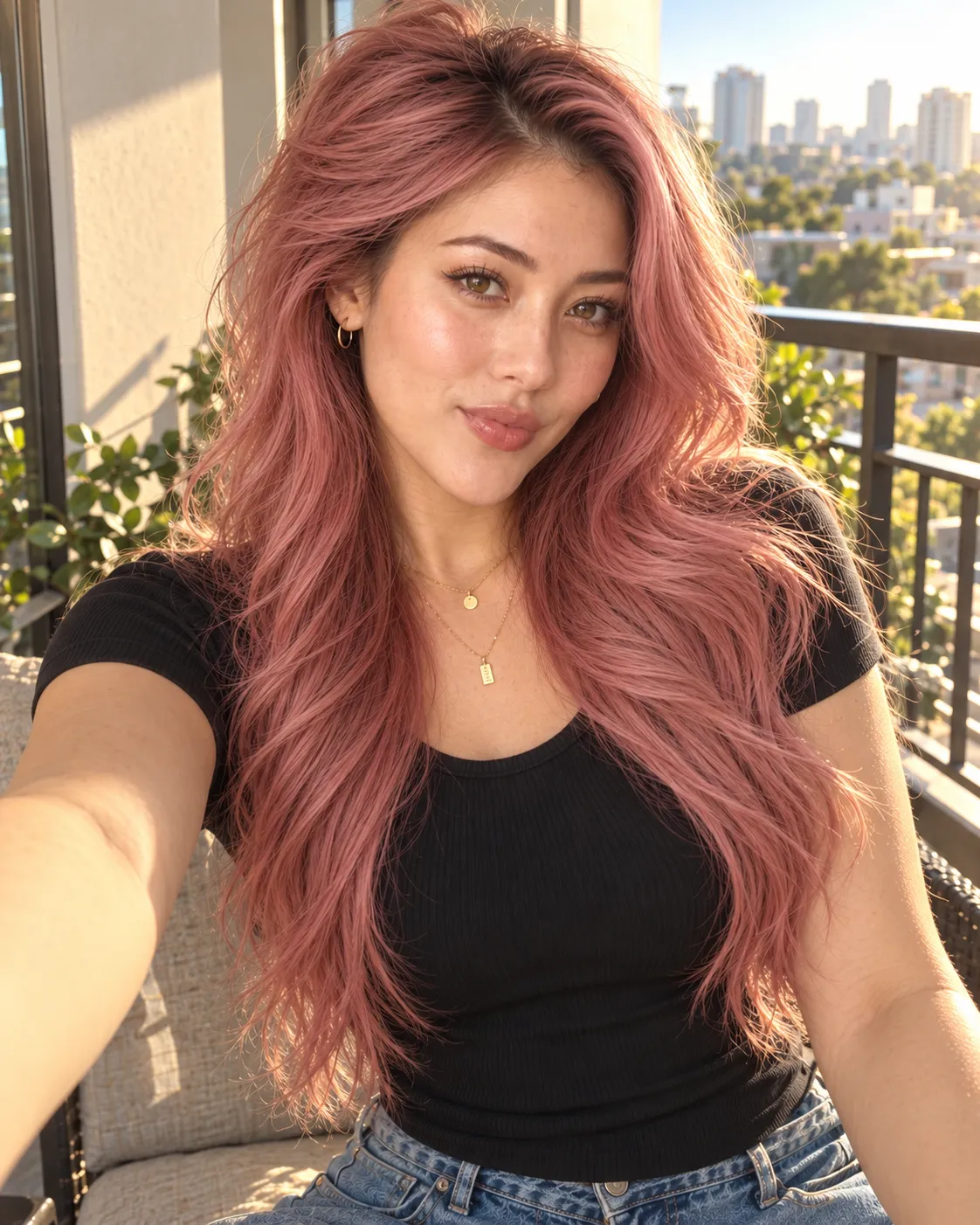
Caption: Begin the video with a standalone single selfie, keeping eyes, nose, lips, and hairstyle clearly visible. First test subtle facial expressions, then gradually add more movements.
Original Universal Template 5: Short Selfie Expression Video
以上传的单张自拍为起始参考,保持同一人物的面部比例、年龄、玫瑰粉长发、分线、金色配饰和当前服装。
她先自然看向镜头,再慢慢露出一个轻微笑容,头部只做很小的自然调整。
保持举机手臂的姿态,镜头只有极轻的手持感,不突然推拉或旋转。
光线稳定,少量发丝轻动,背景透视和人物五官连续。
单一镜头,不说话、不大幅转身、不增加人物或物品,不让头发遮住整张脸。
For the first test segment, schedule only one primary action. If you simultaneously require walking, turning the head, holding objects, and speaking, it becomes much harder to pinpoint the cause when issues arise.
When reviewing the video, don’t just focus on the first and last frames. Pay attention to whether the nose-to-lip ratio fluctuates during smile changes, if eye shapes shift, or if hair suddenly appears shorter; also check whether the arm holding the device aligns smoothly with the background. When voiceover is required, separately confirm the current tool’s audio input method and arrange sound-and-lip-sync checks.
If deviations occur, correct them item by item according to the specific issue.
Identified problems | What to check first | How to adjust in the next round |
|---|---|---|
Changing expressions makes it look like another person | Are eye shape, nose–lip area, and jaw still consistent with the original template | Reduce the intensity of facial expressions while maintaining clear facial angles, continuing to reference the original identity |
Every frame shows the same smile | Whether the same pose and camera angle are used repeatedly. | Specify separately the selfie with raised eyebrows, seated smiling pose, and natural reaction in a restaurant |
Pink hair shortened or recolored | Whether hair length and parting have been altered by the new scene | Reiterate the under‑breast length, side part, and rose pink color, distinguishing environmental tinting from actual changes |
Abnormal arm position in photos or mirrors | Phone obstruction, finger positioning, and reflection relationships | Arrange only one phone and one gesture at a time, clearly indicating the relative positions of face and phone |
The figure appears glued to the background | Main facial lighting, hair strand edges, and clothing shadows | Clearly define the direction of ambient light and recheck the lighting relationship between the subject and the scene |
Deformation of dining forks, fingers, or food items | Whether contact relationships are overly complex | Position the fork above the plate to minimize simultaneous contact with the face or food |
When making revisions, address only one major issue per round. First adjust identity or hands, then refine makeup and composition—this approach makes it easier to determine which step truly improves the image.
Before publishing, review characters, expressions, and visual materials.
Prior to going live, you can use this checklist to review your group’s content:
Compare new images side-by-side with character references; age, eye shape, nose-to-lip ratio, hair color, length, and parting remain consistent.
Expressions, poses, and shooting distances serve specific creative purposes, rather than turning every photo into an identical frontal portrait.
Phones, mirrors, fingers, jewelry, and tableware maintain natural structural relationships, while the subject’s lighting harmonizes with the environment.
Text matches visuals, with each item clearly addressing its designated topic.
Character introductions and content descriptions clearly articulate their fictional AI identities.
Use original or authorized reference materials; for collaborative content, provide honest disclosure without fabricating user experiences.
After exporting, recheck cropping, image quality, and video frame rates, and confirm compliance with current AI content labeling requirements on the publishing platform.
For brand collaborations, first clearly outline required image/video specifications, character traits, product features, as well as acceptance criteria and revision scope. Collaboration terms and revenue should be aligned with actual content and business circumstances.
Frequently Asked Questions
Must the character master template always use a frontal gray‑background photo?
Clear scene selfies are acceptable. The phone should not obscure the face, eyes and nose–lip area must be identifiable, and hairstyle clearly defined—these are crucial conditions for later identity comparisons. If angles are complex, additional more frontal reference shots may be provided.
How can you avoid having characters that look identical yet lack the appeal of internet celebrities?
Clearly describe makeup, expressions, movements, camera angles, and scene settings all together. Keep the same person’s face consistent while ensuring each piece of content showcases a distinct style.
Do you need complex actions and voiceovers right from the start?
You can begin with simple selfies, seated poses, and single expression changes. The choice of topic, tone of text, and visual reactions can also convey personality; audio production should be arranged later based on content needs.
Does creating a virtual blogger require training a dedicated model?
This article starts with character references and prompt words, without assuming the need for custom training, but still requires careful selection frame by frame. Whether to adopt training or other identity-control methods should be evaluated according to the specific tools, tasks, and budget at hand.
You can start with PixPix image generation, replacing Mira’s settings with your own original character. First, complete a selfie with a clear style, then test the character’s identity and expressiveness in a new scene.

AI Image Tool Built for E-commerce Teams
For new product launches, advertising, and promotional campaigns, use AI to generate product images, scene visuals, ad creatives, and short video assets — making content production faster.