How can you ensure character consistency across multiple scenes in AI-generated video? Use PixPix to lock the subject and maintain seamless transitions between shots.
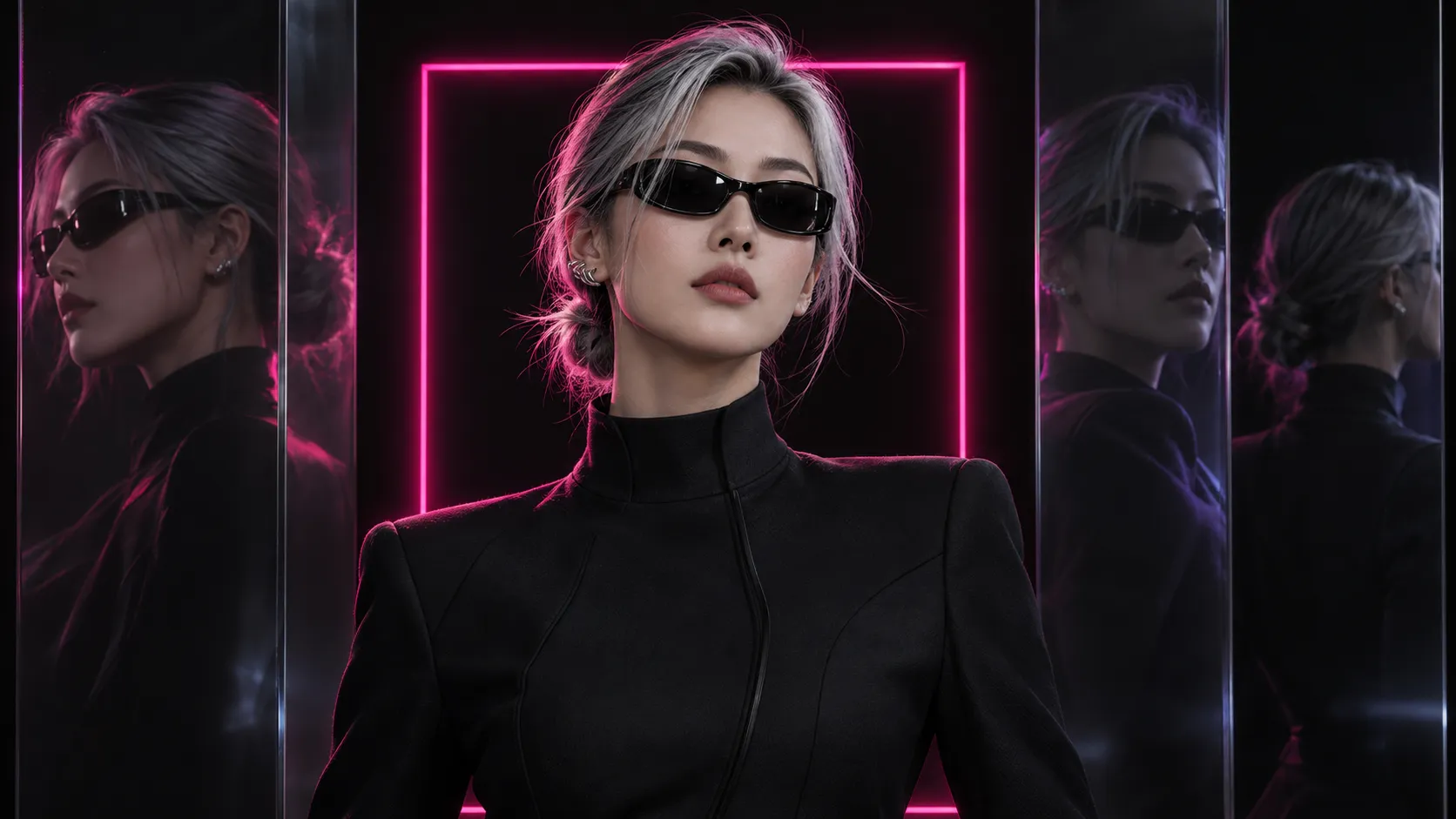
The issue of character consistency in AI-generated videos usually isn't whether the first video looks like the original, but rather whether the character's facial features, age, hairstyle, clothing, and props can still remain consistent after transitioning to a second location, a third shot type, or a fourth action.
This article uses PixPix to design a repeatable multi-scene character workflow: first establish a character master template, then break down shots, reuse reference materials, hand off approved footage, and check for identity drift after each shot. The article does not present empirical measurements of unexecuted generation processes; please refer to PixPix’s current page for specific entry points, specifications, and available models.
Quick conclusion: Consistency comes from the workflow, not just from the model.
To ensure that the same AI character can stably appear across multiple video scenes, you need to accomplish four things simultaneously:
Use character reference images to fix the face, hairstyle, body proportions, clothing, and signature props;
Break the story into short shots, with each shot focusing on only one primary action;
Reintroduce the character master template with every generation, adding frames approved from the previous shot when necessary;
Check after completing each shot to prevent minor errors from propagating into subsequent scenes.
As of the time this article was compiled, PixPix’s public page showcases various reference-driven video models. You can first filter by task rather than asking “which model is absolutely best”:
Main tasks | You can prioritize testing | Official publicly available capabilities and selection rationale |
|---|---|---|
4–15 seconds of character motion, clear camera movement, and stable subject presence | MiniMax H3 | Supports text, image, video, and audio references, emphasizing character consistency, shot execution, and physical feedback |
Multimodal references, native sound, complex shots, or storyboard control | Kling 3.0 Omni | Integrates text, images, video, and audio references with generation, editing, sound, and multi-shot control within the same workflow |
15–30 seconds of narrative, multiple references, extended timelines, and post-editing | Seedance 2.5 | Official materials emphasize multimodal references, up to 30 seconds of generation, continued extension, and 1080P output |
This table is based on official positioning and task-matching recommendations, not on empirically measured rankings under identical conditions. For formal projects, first select two candidate models, use the same set of character references, shot prompts, aspect ratios, and checklists to complete three-shot tests, then compare the number of rework iterations required.
Why does a character turn into someone else across different shots?
Drift within a single video
When a character turns their head in a shot, gets obscured by hands or props, moves quickly, or when the camera pans to the side or rear, the amount of usable facial information available to the model decreases. Common outcomes include changes in eye distance, shifts in the hairline, alterations to the collar, transformations in the shape of props held in the hand, and even sudden appearances of the character looking younger or older during motion.
Drift between different scenes
Each new shot is a fresh generation task. Repeating phrases like “silver-gray-haired woman, black suit” only yields a character category rather than a unique identity. New locations, lighting, and angles further alter the visual evidence, so even if the second shot looks “very similar,” it may no longer depict the same character.
Text prompts cannot replace visual references.
Text is suitable for describing actions, settings, and camera movements, but it struggles to precisely capture details such as eye spacing, nose bridge contours, clothing cuts, or prop proportions. Reference images provide the model with direct visual anchors, while textual prompts specify what should change in this shot and what must remain consistent.
A more reliable division of labor is: reference images define “who she is,” while prompts specify “where she is now, what she’s doing, and how the shot should be framed.”
First, establish a continuity file for original characters.
This article uses the original adult character “Gu Yao” as a teaching example. She is a visual creative professional with layered silver-gray short hair pulled back into a low bun, wearing black narrow-framed sunglasses and a sculptural silver ear clip on her right ear. She dons a black high-necked, tech-inspired suit paired with black wide-leg pants, accessorized with black gloves and carrying a black handbag featuring a magenta narrow border.
The four shots take place sequentially in a black fashion studio, a rainy urban corridor, a mirrored exhibition hall, and a city rooftop at dusk. While the settings and camera angles vary, the character’s identity, hairstyle contour, sunglasses, right-ear clip, clothing structure, and handbag design must remain consistent throughout.
Distinguish between fixed anchors and variable elements.
Type | Content of this case | Verification method |
|---|---|---|
Facial anchor points | Adult oval face shape, consistent facial feature proportions, and jawline | Compare frontal and three-quarter angle master images |
Hairstyle anchor points | Layered silver-gray short hair, low bun, and fixed stray-hair outline | Check hair parting, hair color, and bun position |
Clothing anchor points | Black high-neck, fitted top, wide-leg pants, and gloves | Inspect shoulder line, waistline, seams, and pant fit |
Accessory anchor points | Black narrow-framed sunglasses and a silver ear clip on the right ear | Verify left-right orientation, proportions, and shape |
Prop anchor points | Black handbag with a magenta narrow border | Check size, crisp silhouette, and color-border positioning |
Variable elements | Location, shot type, action, weather, camera movement | Each shot should only change what is necessary |
Prepare a set of references rather than just one reference image
A single frontal portrait cannot adequately convey a character’s profile, back view clothing, or full-body proportions. It is recommended to prepare at least:
Frontal half-length shot: confirm face shape, sunglasses, hairstyle, and earring;
Three-quarter full-body shot: confirm body shape, garment tailoring, and handbag proportions;
Side view: support head turns, walking, and tracking shots;
Back view: confirm hair bun position, shoulder line, and upper garment back panel;
Prop close-up: fix the handbag, earring, and sunglasses structure.
Reference images should use even lighting and clear outlines—avoid heavy filters that obscure facial features, and do not mix multiple costume versions into a single character master.
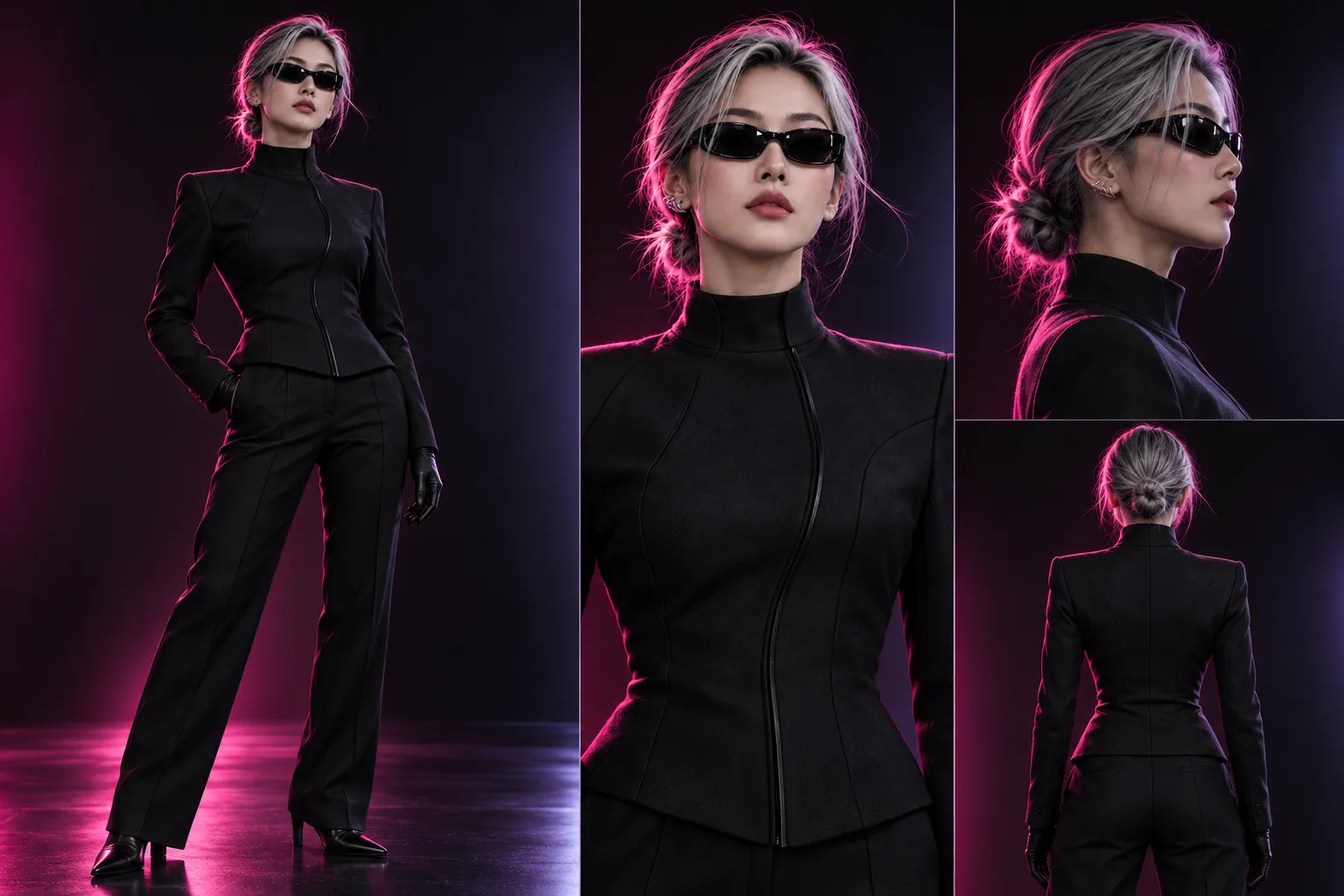
Caption: The character master simultaneously records the face, silver-gray hair bun, black narrow-frame sunglasses, silver earring on the right ear, and black turtleneck outfit; subsequent scenes will refer back to this image for identity verification.
In PixPix, select a video model based on the shot task
MiniMax H3: first test subject stability in short shots
PixPix’s MiniMax H3 official page currently states that it supports text, images, video, and audio inputs, can handle characters, actions, shots, and temporal sequences, with “subject stability” as its key capability. The publicly listed generation specifications are 4–15 seconds, up to 2K resolution at 24fps, with specific options depending on the generation mode.
It is best suited for prioritizing tests involving tracking shots, push‑pulls, panning, tilts, lifts, or circling—clearly defined camera movements—as well as short shots where people, clothing, and props need to remain stable during motion. For the first test, avoid combining fast running, 360-degree circling, costume changes, or complex object interactions all at once.
Kling 3.0 Omni: handles multiple references and complex audiovisual tasks
PixPix’s Kling 3.0 Omni official page positions it as an all‑modal video model capable of integrating text, images, video, and audio references, while offering video generation, editing, native audio, and multi‑shot storyboard control.
When a project requires simultaneously locking down characters, scene tone, action references, and sound, or when a task itself involves more complex shot arrangements, Kling 3.0 Omni can be considered as a candidate. The more input material provided, the more crucial it becomes to clearly specify which reference corresponds to characters, actions, scenes, or sounds, thus preventing model misinterpretation of relationships.
Seedance 2.5: tests longer narratives and multi-reference connections
According to PixPix’s Seedance high-definition capabilities description, Seedance 2.5 currently supports generating up to 30 seconds, handling multiple images, videos, and audio references, with continued extension and output at 1080P resolution.
When shots demand extended action sequences, seamless continuity between characters and settings, or further lengthening and adjustments later on, Seedance 2.5 should be prioritized for testing. Longer durations do not automatically mean greater natural stability; if the action is complex, it is still advisable to first verify identity and movement structure using shorter versions before moving to final specifications.
Break the story into four checkable shots
Consistency testing should not begin by generating an entire short film at once. Instead, start with four distinct yet manageable shots, gradually increasing complexity.
Shots | Scenes and actions | Key Changes | Must be maintained |
|---|---|---|---|
1 | Medium shot in a black studio, with Gu Yao standing in front of a magenta light frame | Establishing the character and props | Front view, hair bun, sunglasses, ear clip, clothing, and handbag |
2 | Urban corridor on a rainy night, with the camera tracking from the side rear as the subject walks | Environment and movement | Side profile, position of the hair bun, back of the upper garment, and shape of the handbag |
3 | Low-angle shot in a mirrored exhibition hall, with Gu Yao reaching out to adjust a transparent display stand | Posture and object interaction | Age, body proportions, position of the ear clip, and structure of the clothing |
4 | Wide-angle shot of a city rooftop at dusk, with Gu Yao looking back toward the city | Lighting and distant views | Character silhouette, hair color, black clothing, and colored edges of the handbag |
Shot 1: First establish the character and props
Shot 1 uses a stable medium shot, with Gu Yao standing in front of a magenta light frame in a black studio. This shot does not aim for complex movements; instead, it focuses on confirming whether the front face, hairstyle, sunglasses, clothing, and handbag can all coexist harmoniously.
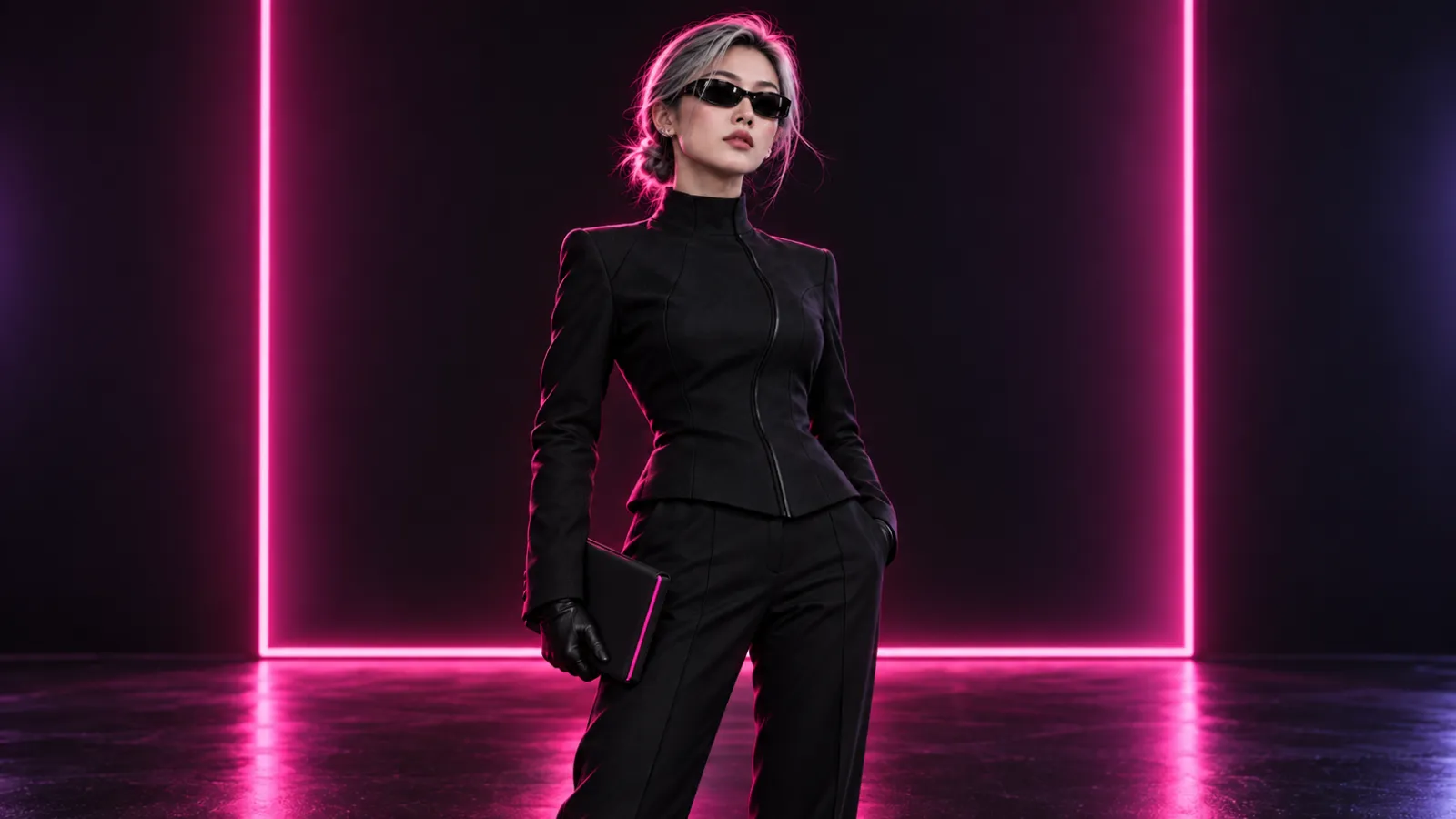
Caption: The first shot establishes the baseline for the character, clothing, and props using a clear three-quarter facial view and simple hand gestures.
Shot 2: Changing the environment and adding walking
Shot 2 moves the character into an urban corridor on a rainy night, tracked from the left rear. It is necessary to verify whether the side profile, position of the hair bun, back of the upper garment, and black handbag remain consistent.
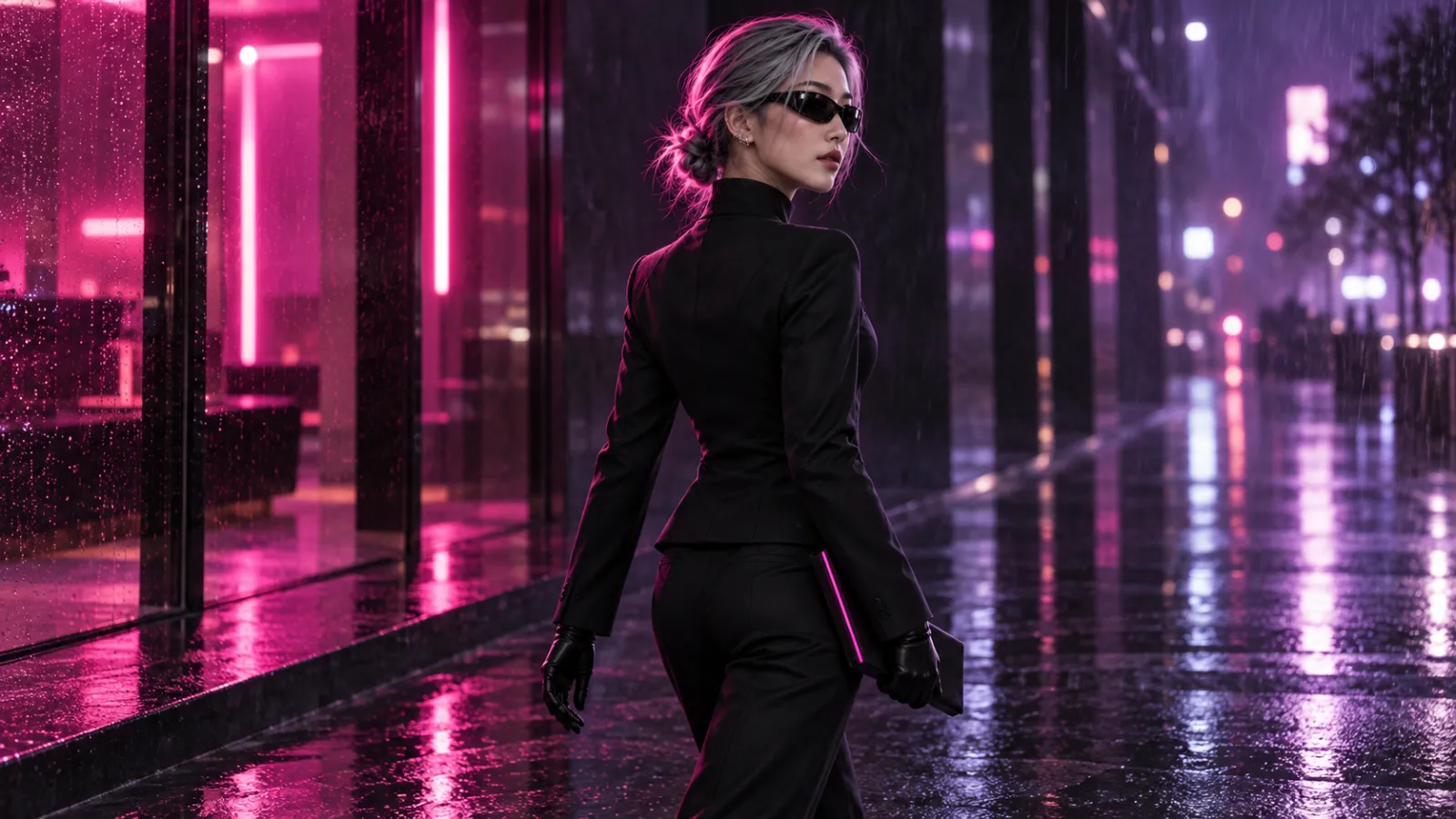
Caption: Although the scene, lighting, and actions have changed, the character’s age, hair bun outline, sunglasses, right-ear ear clip, upper garment structure, and handbag shape must still be preserved.
Shot 3: Adding pose variations and object interactions
Shot 3 has Gu Yao reaching out to adjust a transparent display stand in a mirrored exhibition hall. Low-angle shots, mirror reflections, and hand-object interactions increase the risk of distorted body proportions and repeated deformations of both the character and hands; therefore, the handbag remains nearby as a stable reference point.
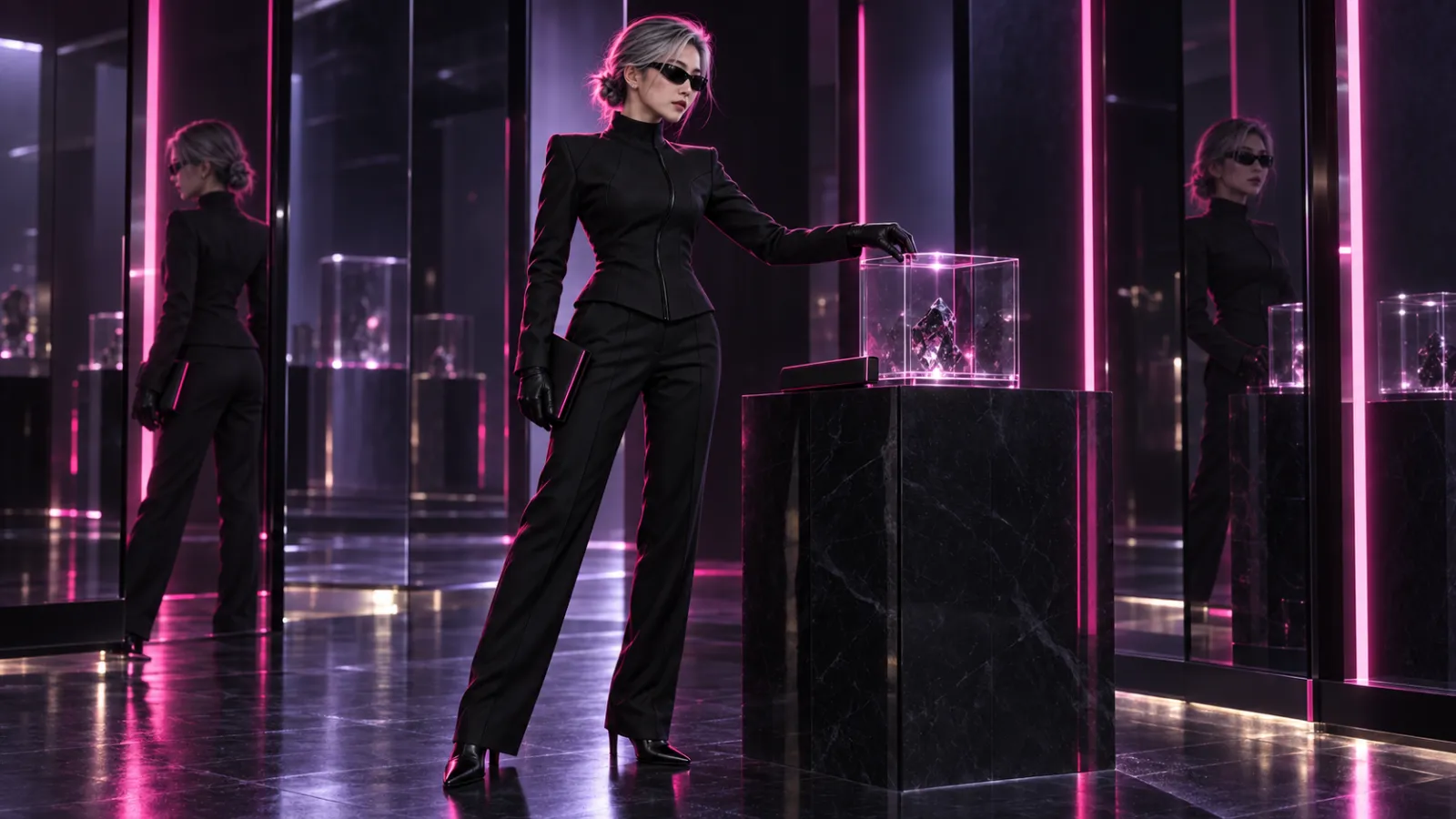
Caption: When mirror reflections and object interactions occur simultaneously, one should carefully check the face, hair bun, ear clip, clothing seams, hand contact relationships, and handbag proportions.
Shot 4: Using a long shot to verify the character’s silhouette
Shot 4 cuts to a wide-angle view of the rooftop at dusk, with Gu Yao facing away from the city and turning her head. In the long shot, facial details are reduced, relying instead on her silver-gray chignon, the outline of her sunglasses, the silhouette of her black suit, and the magenta trim on her handbag to maintain recognition.
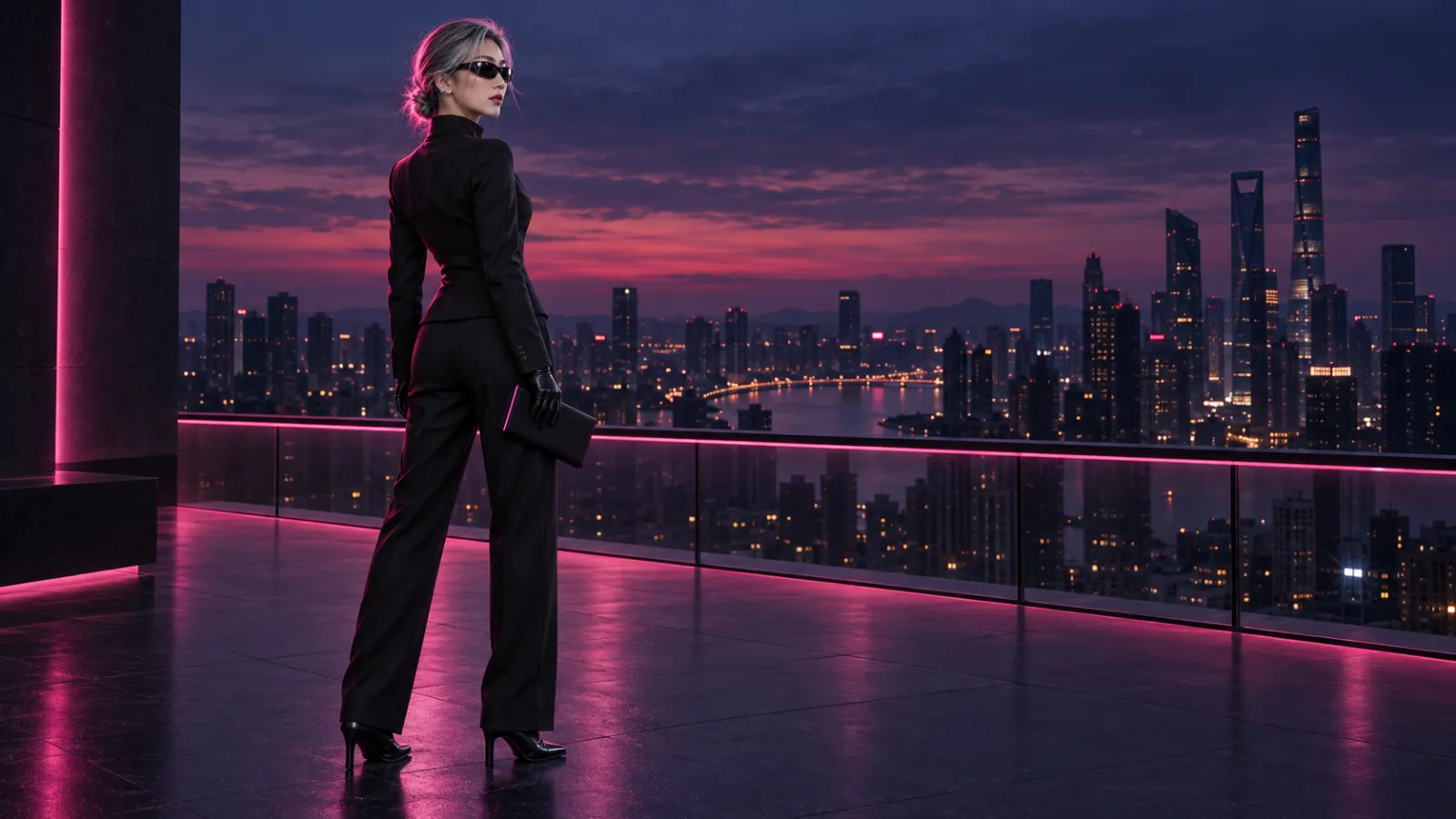
Caption: The main changes in the final shot lie in the shot size and lighting; the character’s silhouette, color blocks of clothing, and prop colors should still match the master template.
After passing through Shot 1, proceed directly to Shot 2. If Shot 2 already shows changes in the character’s profile, hairstyle, or handbag, do not continue using it as the sole reference for Shot 3.
Use fixed identity blocks to write prompt words for each shot.
General Character Identity Block
Below is a reusable template designed specifically for this case—not original prompts from reference articles or any models:
General Template | Character Identity Block
Original adult female character Gu Yao, with an oval face shape, layered silver-gray short hair pulled back into a low chignon, wearing black narrow-framed sunglasses and a sculptural silver ear clip on her right ear. She wears a black high-neck, fitted tech-inspired top, black wide-leg pants, and black gloves, carrying a structured black handbag with a narrow magenta border. Maintain the same face shape, age, chignon position, body proportions, garment seams, sunglasses, ear clip orientation, and handbag structure—no outfit changes, no additional accessories.
This identity block should be repeated in every shot. Scene-specific prompt words only add location, shot size, action, camera, environmental dynamics, sound, and the ending state.
Shot Prompt Structure
It can be organized in the following order:
Scene and time;
Shot size and camera position;
One major character action;
One camera movement;
Elements in the environment allowed to move;
Sound requirements;
Unchanging elements of characters and props;
Pose and composition at the end of the shot.
Example for Shot 2
General Template | Rainy Night Follow-Camera Shot
A modern urban corridor under rainy night conditions, with restrained wet reflections on the ground. Medium-to-large full-body shot, with the camera positioned slightly behind and to the left of Gu Yao, slowly tracking alongside her. Gu Yao holds a black handbag with a narrow magenta border, walking forward at a steady pace, occasionally glancing briefly toward the camera. Rainwater, the hem of her top, and the tips of her hair move naturally, while the background remains clean and free of other figures approaching the subject. Keep the character’s identity block unchanged—face shape, age, silver-gray chignon, black narrow-frame sunglasses, silver ear clip on the right ear, tailored clothing, and handbag structure. At the end of the shot, Gu Yao stops at the right third line of the frame, her profile and handbag fully visible.
There’s no need to repeatedly pile up abstract adjectives like “cinematic,” “stunning,” or “high-end” in your prompts. For greater consistency, it’s more helpful to clearly specify where the camera is, how many actions the character performs, what must remain unchanged, and where the shot concludes.
Let the previous shot assist the next one, rather than propagating errors.
The primary reference and the transition frame serve different purposes.
The character master template serves as the primary reference, ensuring long-term identity; the approved frame from the previous shot acts as a secondary reference, responsible for the current outfit status, light direction, and spatial continuity. Each new shot should still incorporate the character master template and not rely solely on the preceding output frame.
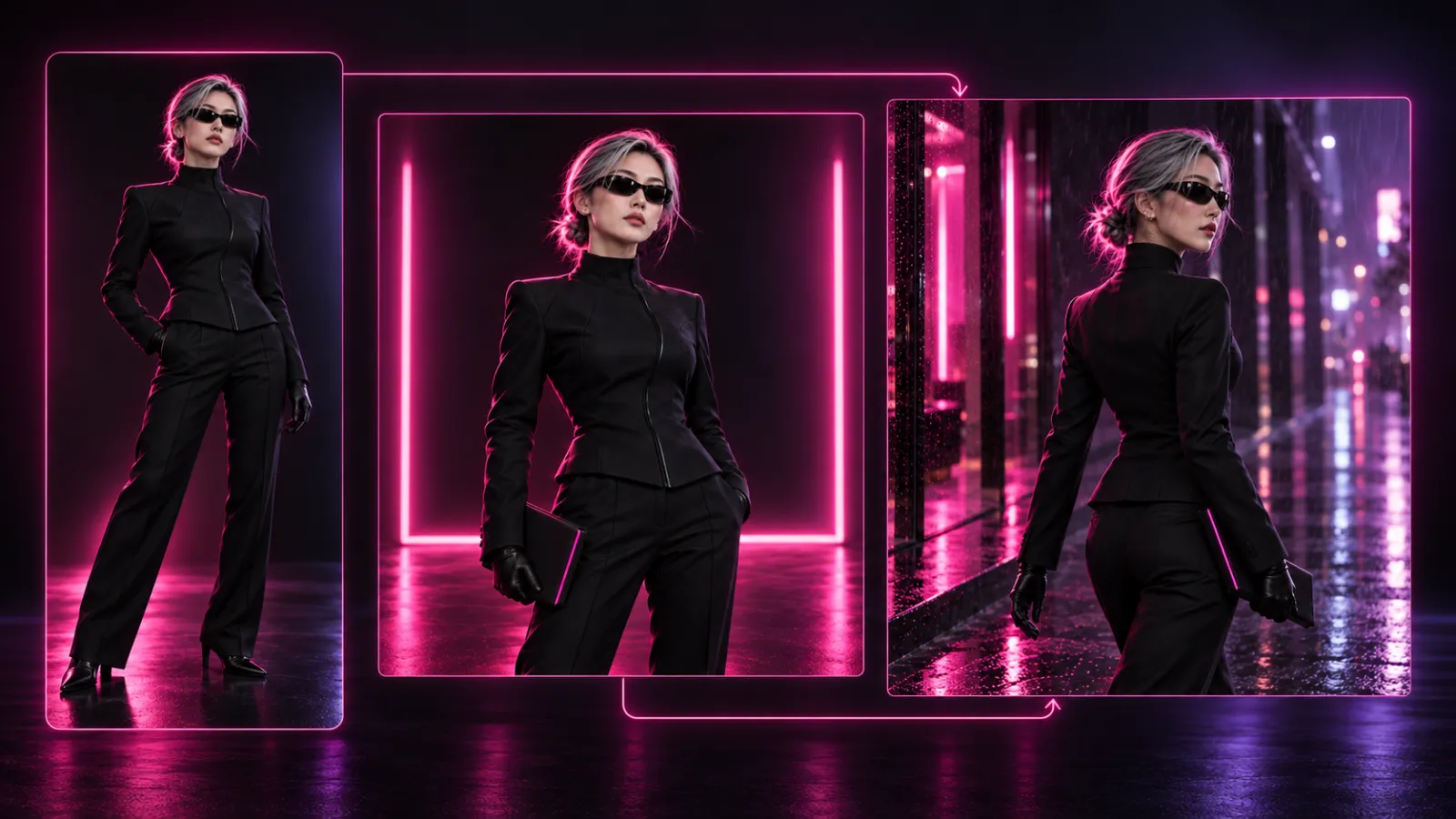
Caption: The master version continuously maintains the character’s identity, and approved frames supplement the current state of clothing, props, and settings; both are advanced together into the next shot, rather than merely passing on the previous frame.
Only pass clean, approved frames.
Select shots where the face is clear, free from motion blur, with hands and props fully visible, and the clothing’s structure intact. If the last frame of a shot happens to show closed eyes, occlusion, or deformation, choose a nearby, more stable frame as a visual reference and handle the transition separately during editing.
Regularly return to the character master.
Continuously passing the previous shot to the next can cause subtle changes to accumulate gradually. After completing two or three shots, re‑check against the character master; if noticeable drift occurs, revert to the master or an earlier strong reference to regenerate the sequence, rather than continuing to use the erroneous frame.
Use the same checklist to approve each shot.
After each video is rendered, at least verify the following items:
Checklist item | Passing criteria | Common failures |
|---|---|---|
Facial identity | Facial proportions, age, and face shape remain consistent | Changes in eye distance, facial rejuvenation, or nasal bridge reconstruction |
Hairstyle | Silver-gray hair color, parting, stray strands, and low bun position all remain consistent | Bun switching sides, sudden hair lengthening, or discoloration |
Clothing | For high-necked tops, shoulder lines, waistlines, seams, and pant styles all match consistently | Collar changes, seam disappearance, or pattern drift |
Accessories | Sunglasses proportions remain stable, with the silver ear clip on the right ear present and correctly oriented | Left-right swaps, repeated appearances, or deformations |
Props | Black handbag size, firm silhouette, and continuous magenta edging | Bag softening, color edge shifting, or inexplicable disappearance |
Actions and physics | Gait, fabric behavior, rain effects, and contact dynamics appear natural | Slipping steps, interpenetration, or finger adhesion |
Shot transitions | Foreground and background sizes, gaze direction, and motion can be edited | Sudden shifts in character positioning or abrupt reversals of directional axes |
Facial identity, age, signature clothing, and props are considered hard‑core verification items; if they fail, corrections or rework are required. Changes in the placement of minor background objects are usually soft issues, with acceptance depending on the narrative context of the shot.
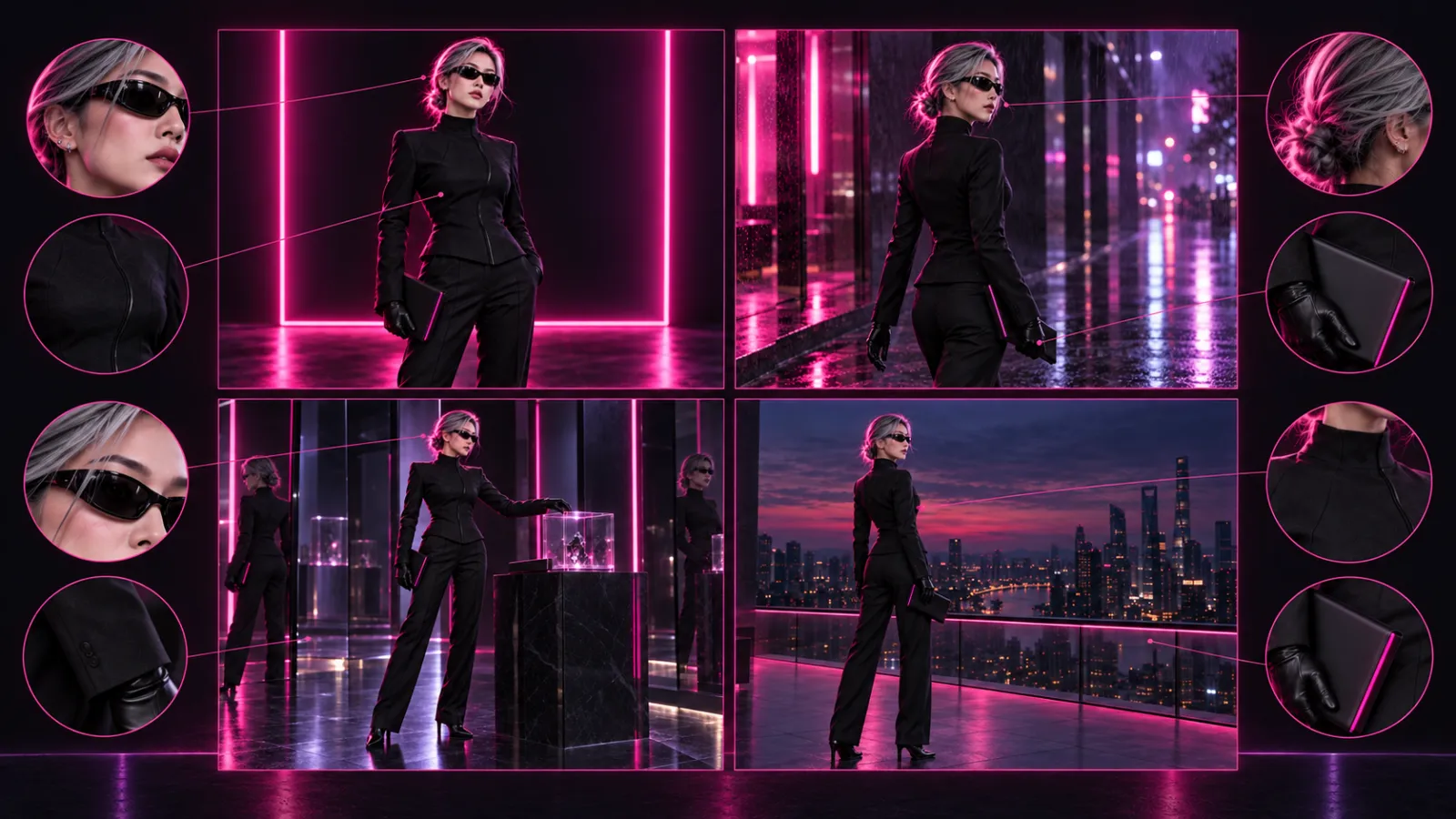
Caption: Examining four shots side by side makes it easier to spot issues like a misplaced hair bun, altered sunglasses proportions, a missing earring, shifting garment seams, or a deformed handbag than judging each frame individually based on impression.
Six practices most likely to disrupt character consistency
Only repeat text, not reference images
The same prompt can only maintain a character’s category but cannot reliably preserve their unique identity. Each shot should re‑reference the same master template.
Packing too many actions into a single shot
Running, turning, opening a handbag, reaching out to interact, crouching, and looking up simultaneously increases occlusion and pose variations. First establish one primary action, then use subsequent shots to complete the next step.
Carrying an incorrect end frame forward indefinitely
If the hairstyle from the previous shot has already grown longer, subsequent shots will treat this error as the new norm. Before handing off, always perform a final check; if drift occurs, revert to the character’s master template.
Changing location, lighting, costume, and camera position all at once
When too many variables change at once, it becomes difficult to pinpoint which factor caused the identity shift. During testing, introduce only one major challenge per shot.
Multiple characters sharing a single reference image
In multi‑character scenes, facial blending, swapped costumes, and mismatched props are common. Prepare independent references for each character, clearly defining their spatial positions and interaction sequences.
Prioritize the highest resolution first, then verify the characters
High resolution cannot fix identities that have already drifted. First confirm the character, movements, and shot composition using specifications suitable for iterative refinement, then proceed to final output settings.
Frequently asked questions
Can a single portrait suffice for multi‑scene video production?
Testing is possible, but a frontal photo lacks side views, rear perspectives, and full‑body proportions. The more angles you capture, the more essential it becomes to supplement with multi‑angle character references and close‑up shots of props.
Which video model in PixPix best supports character consistency?
There is no universal answer applicable across all tasks. For short actions, clear camera movement, and stable subjects, H3 can be tested first; for multiple references, audio integration, and complex shot arrangements, Kling 3.0 Omni is suitable; and for longer narratives and multimodal references, Seedance 2.5 may be preferable. Ultimately, the choice should come from a three‑shot comparison under identical conditions.
Will using the last frame of the previous shot guarantee no face changes?
No. While the end frame helps convey current costume, lighting, and composition, it may also carry motion blur, closed eyes, or subtle deformations. It should serve as supplementary reference, with the character’s master template remaining the long-term standard for identity.
Can characters change outfits mid‑scene?
Yes, but outfit changes should be explicitly defined as part of the storyline. Preserve the character’s face, hairstyle, age, and body proportions, while creating new front, side, and back references for the new attire—do not let the model infer clothing structure on its own.
How can we minimize identity swaps during multi‑character dialogues?
Prepare independent references for each person, generate individual reaction shots first, then handle medium‑range two‑person scenes. Clearly specify each character’s left/right position, gaze direction, and sequence of actions in the prompts; if faces still swap, break down the shot further and establish dialogue pacing during editing.
What should be considered when using real‑life reference photos?
Ensure you have proper usage rights and authorization for the subject, and avoid creating misleading content using unauthorized portraits. Before public or commercial use, also verify relevant rules applicable to your target platform and region.
Summary
Character consistency in multi-scenario AI video isn’t a matter of luck achieved in a single generation; rather, it’s a systematic production process that can be rigorously checked:
Establish a character master → Define rigid anchor points → Select models based on specific tasks → Introduce only one primary variable per shot → Reuse the master and approve key frames → Perform shot-by-shot acceptance checks → Re-anchor during drift.
When starting a project in PixPix, you can begin by replacing the four-shot test structure originally created by Gu Yao with your own original characters. Generating just the first three shots is sufficient to assess whether the front view, side view, motion, lighting, and props remain consistent; once these are approved, you can then expand into a full story—making it easier to manage rework costs than directly generating a long-form piece.

AI Image Tool Built for E-commerce Teams
For new product launches, advertising, and promotional campaigns, use AI to generate product images, scene visuals, ad creatives, and short video assets — making content production faster.