How to Recreate a Plot-Twist Necklace Ad Video Using PixPix

This vertical-format necklace ad, approximately 10秒 in length, first grabs attention with the suspense of “Will the person fall?”, then transforms the rescue chain into part of the necklace, and finally reveals the product with a close-up of the pendant. Its core isn’t to directly showcase the jewelry; instead, it invites viewers to first experience an unexpected little story.
Video Frame Breakdown
At the beginning of the scene, a car hangs suspended beneath the blue sky. The car door opens, and a woman in a dark dress clings to the edge, her body dangling in mid-air. On the left, large white text appears sequentially: DON’T WORRY I WON’T FALL.
Next, the figure releases the car door and begins to fall. The camera cuts to a massive golden chain stretching across the sky; she grabs onto one of its links and moves along it. The earlier text also transitions alongside the visuals into BUT I FELL—turning the tense falling sequence into a humorous twist.
As the shot pulls back, the giant chain gradually reveals itself as the two sides of a necklace. In the center, a multi-layered circular pendant made of gold appears, its outer rim adorned with sparkling transparent gemstones. Finally, the figure becomes tiny within the frame, while the necklace takes center stage, and the text FOR THIS clarifies the twist: she “fell” for the sake of this piece of jewelry.
phase | visual focus | function |
|---|---|---|
opening | suspended vehicle, figure gripping the car door | quickly builds a sense of danger |
turning point | character falling, giant golden chain enters the frame | uses scale shifts to create surprise |
reveals the product | camera pulls back, linking the chain to the pendant | transforms narrative props into the product |
ending | close-up of the floating golden pendant and | helps viewers remember the product |
Why does this necklace ad stick in your memory?
Uses storytelling to delay revealing the product
In the first half of the video, the necklace is barely visible. Viewers are focused on whether the character can safely make it down, making them more eager to keep watching. Only after the golden chain appears does the camera gradually reveal its connection to the product.
creates a problem first, then unveils the product , which generates stronger narrative tension than simply presenting the necklace from the start.
Turns a tiny piece of jewelry into a grand spectacle
A necklace is typically a small item meant to be viewed up close, yet this video magnifies its links to a size that allows a character to climb along them. This monumental treatment makes the chain’s shape, metallic sheen, and structural connections the visual focal point, while also setting the stage for the final close-up of the pendant.
Invites text to participate in the twist
DON’T WORRY I WON’T FALL、BUT I FELL and FOR THIS are not standalone advertising slogans; rather, their meanings evolve continuously as the action unfolds. The short phrases, combined with the character’s fall and the reveal of the necklace, enable the video to achieve a complete narrative arc—introduction, development, twist, and conclusion—within an extremely brief timeframe.
How can you recreate this type of necklace video using PixPix?
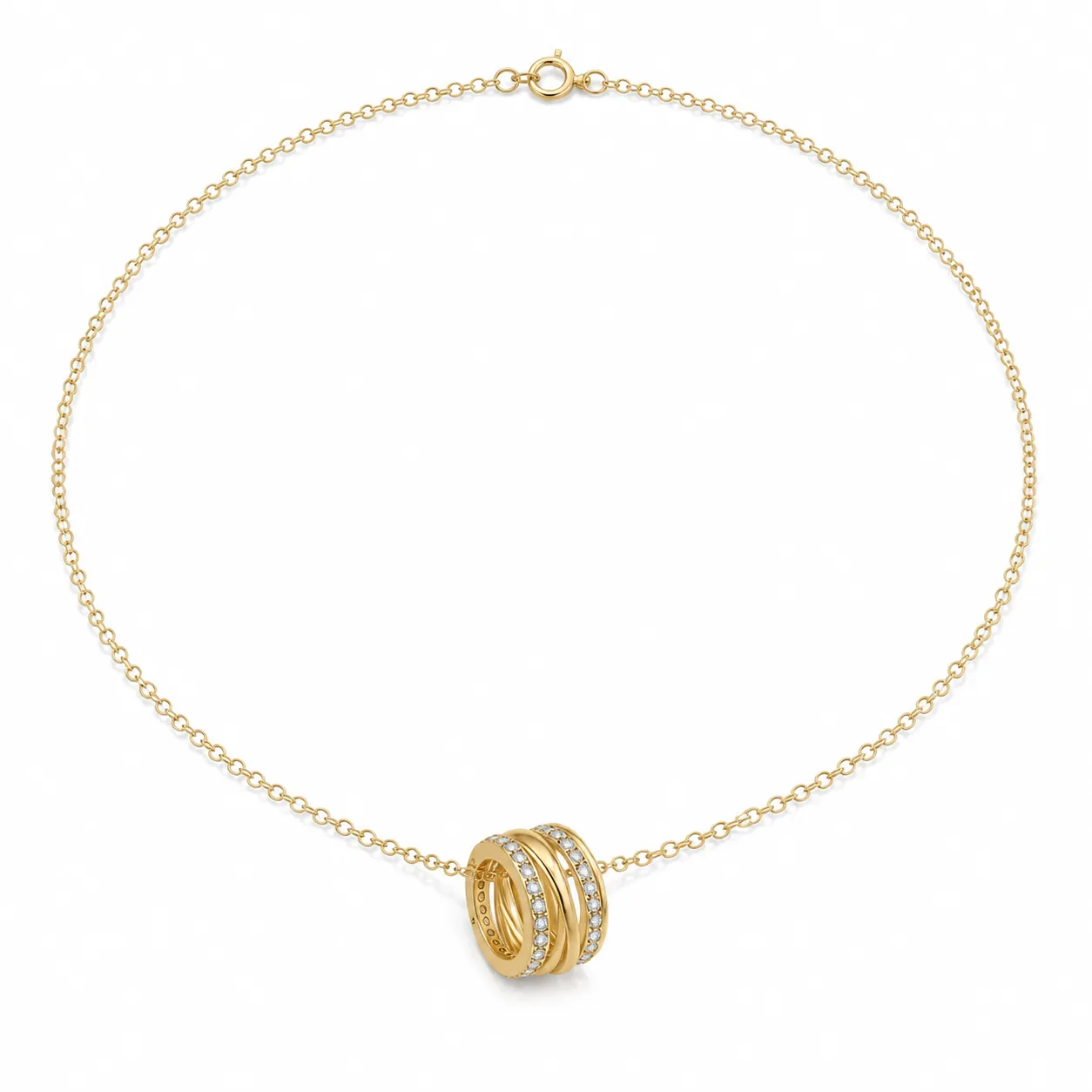
Prepare clear product images of the necklace, ideally showing the entire chain, the front of the pendant, and the side view of the pendant.
Upload these product images to PixPix, asking the AI to recognize the shape of the chain links, the number of layers in the pendant, the arrangement of gemstones, and the metal color.
Break the video into three consecutive segments: “suspended opening—falling while grabbing the chain—zooming out to reveal the necklace.”
After generating the video, check that the character makes proper contact with the chain, that there is a smooth transition in scale from the chain to the necklace, and that the pendant’s shape remains stable.
Add English captions during the editing stage. Text added in post-production usually preserves correct spelling and formatting more easily than if generated directly by the video model.
When recreating the video, you don’t need to copy the suspended car or character poses exactly. What truly deserves emulation is the visual structure comprising suspense, oversized props, scale reversals, and close-ups of the product—.
Video generation prompts
The following prompts have been compiled based on the finished footage and do not reflect the original prompts used in the video. When using them, please replace “the necklace shown in the reference image” with your own product reference image.
A roughly 10-second, 9:16 vertical-format creative ad for a necklace, rendered in a cinematic, realistic style. A bright blue sky with just a few white clouds forms a simple backdrop. The scene opens with a low-angle shot: a dark-colored car hovers above the frame, its door open, while an adult woman in a dark dress clings to the edge of the door, her body suspended in mid-air, her skirt and hair swaying naturally in the breeze.
The woman releases the door and begins to fall. The camera follows her motion, revealing a massive golden metal chain slanting diagonally across the frame from the sky. She safely grabs one of the chain links, pauses briefly, and moves along the chain toward the center. Her hand makes genuine contact with the link, which exhibits a solid metallic structure, weight, and natural reflections.
The camera smoothly and swiftly pulls back, gradually unveiling the giant chain as two sides of a complete necklace. The figure shrinks within the frame, and the central pendant becomes the focal point. The pendant faithfully replicates the outline, metal color, layered structure, and transparent gemstone arrangement seen in the product reference image, maintaining proper connections between the left and right chains and the pendant without altering the jewelry design.
Finally, against a clean blue sky, the necklace floats at the center of the frame. The camera gently zooms in to clearly showcase the pendant’s metallic highlights, inlay details, and three-dimensional depth, leaving a stable close-up of the product. The character’s movements, camera angles, and spatial relationships flow coherently, with the overall rhythm shifting from suspense to a light, engaging product reveal. No text appears in the video itself; all text is added in post-production.
Key checkpoints when recreating the video
Product consistency: The chain links, number of pendant layers, and gemstone arrangements must remain unchanged even after the camera pulls back.
Spatial continuity: The giant chain grasped by the character must seamlessly connect to the final necklace on both sides.
Character movement: The falling and gripping motions should be fluid and continuous, avoiding any unnatural penetration of the hand through the chain links.
Product visibility: The ending should reserve a stable close-up shot so viewers can clearly see the pendant, rather than merely remembering the earlier special effects.
Text accuracy:
DON’T WORRY I WON’T FALL、BUT I FELL、FOR THISIt is recommended to add these captions in post-production to avoid distorted letterforms appearing in the generated footage.
The most replicable aspect of this video is how it transforms the necklace from a mere “product on display” into a “story‑driving element.” When viewers realize that the massive golden chain the character is gripping actually belongs to a necklace, the product reveal becomes the story’s payoff.

AI Image Tool Built for E-commerce Teams
For new product launches, advertising, and promotional campaigns, use AI to generate product images, scene visuals, ad creatives, and short video assets — making content production faster.