2026 AI Animated Short Film Tutorial: PixPix Character Design and Shot-by-Shot Generation
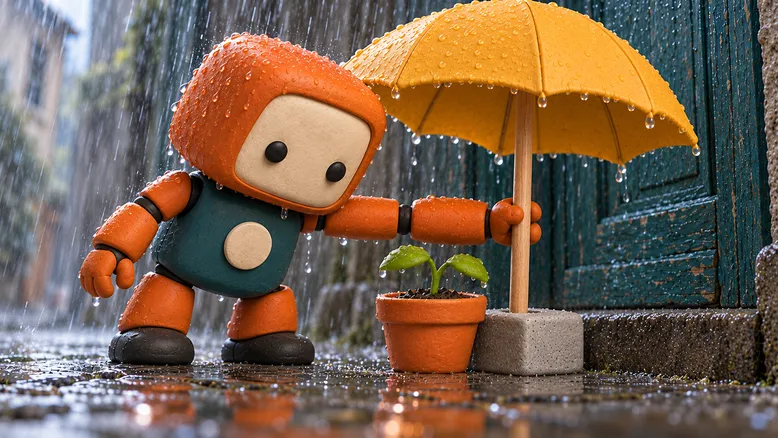
How can you create an AI‑animated short film that leaves viewers remembering the story, rather than just a few pretty visuals? For first‑time creators, start by keeping things simple: one main character, one setting, and one choice —then make every shot advance the same central idea.
Using the original short film “Borrowing a Sunny Day” as an example, this article outlines how to craft a roughly 30 秒 handcrafted‑style 3D animation: a little robot discovers a young seedling in a rainy alley, leaves its yellow umbrella for the plant, and walks off into the rain alone. You’ll receive a breakdown of the story, character design, a five‑shot storyboard, reusable prompt templates, plus methods for preparing assets and conducting shot‑by‑shot testing in Pixilart.
First clearly define one choice, then consider the runtime.
“The little robot strolls in the rain” sets the scene; only when “it leaves its only umbrella for a young seedling” does the character make a meaningful choice. Subsequent shots can revolve around this shift: initially, the robot is being protected, but by the end, it’s the seedling that receives care.
Write a brief task card for this story:
Main character: the little robot “Lili,” carrying an open yellow umbrella as it passes through a rainy alley.
Discovery: A young seedling in a flowerpot by the wall has been bowed low by the raindrops.
Choice: Lili stops and places its umbrella on a stone pedestal beside the flowerpot.
Outcome: The seedling remains under the umbrella, while Lili, now without an umbrella, continues walking into the rain.
Emotion: Expresses tenderness through pausing, bowing, letting go, and walking away—without any dialogue.
Approximately 30 秒 represents only the editing goal for this exercise —not the standard length of an animated short film, nor a requirement for a single model to generate the entire story at once. If key actions need more time, adjust the storyboard first; don’t force characters to suddenly speed up just to meet a specific runtime.
Fix characters, props, and settings to minimize inconsistencies between shots.
Create reusable character designs.
Lili features an original, simplified design: a rounded square orange head, with two black round eyes on a creamy white panel and no mouth; a dark teal green torso adorned with a circular off‑white chest plate, short orange limbs, a three‑fingered mechanical hand, and black round feet.
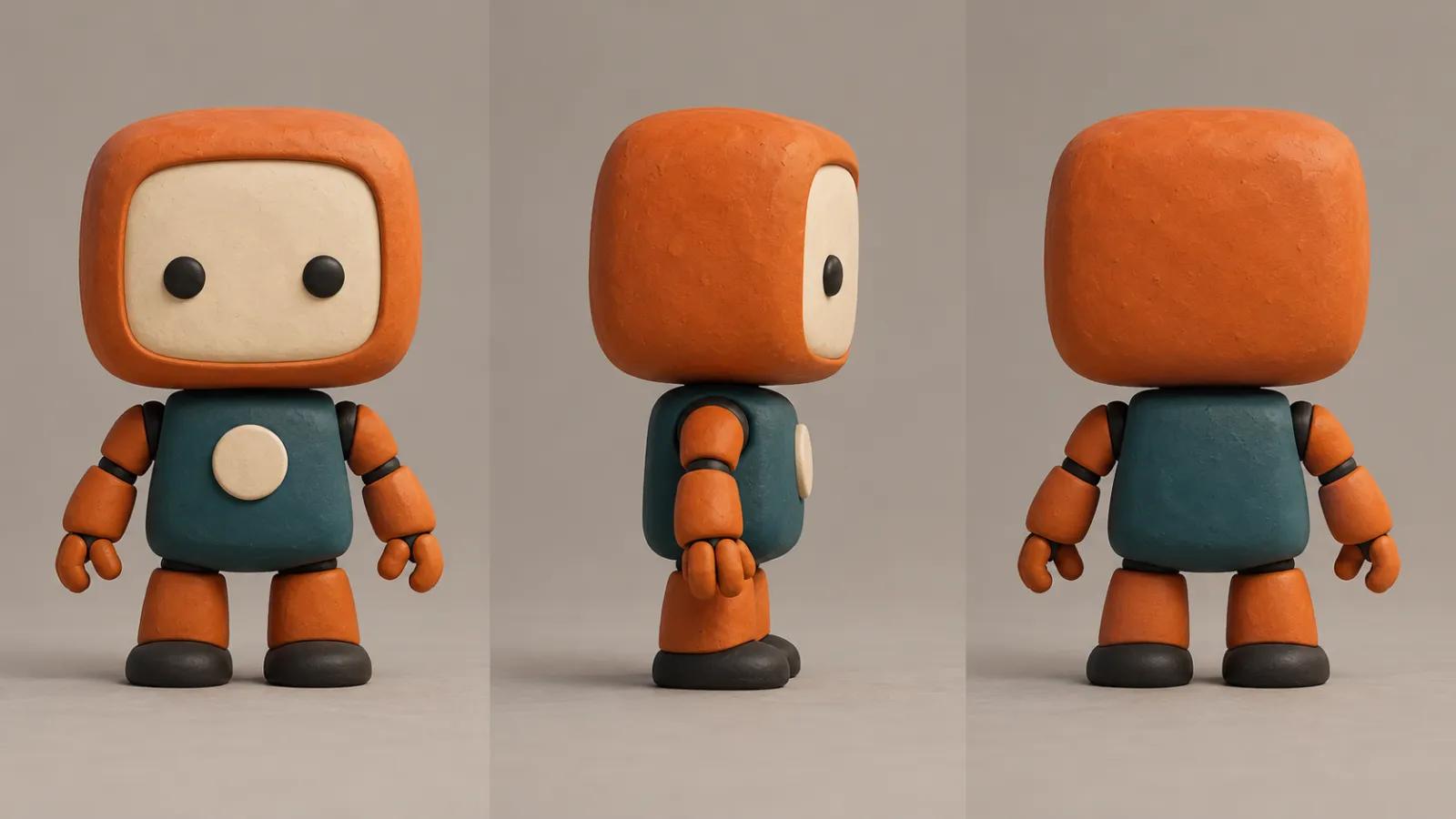
Caption: Original character’s three‑view illustration, intended for art review and reference selection.
First confirm whether the front, side, and back views belong to the same character, then select clear angles for future reference. These three‑view illustrations serve as design check materials—not evidence that three separate character areas should be treated as three protagonists in a single video.
Unchanging elements must be specified precisely enough to allow verification. Rather than simply stating “the same cute robot,” examine the head‑to‑body ratio, number of eyes, shape of the chest plate, and color of the soles. Character names are used for project organization and do not substitute for reference materials.
Ensure key props support narrative actions.
This film features only one mustard‑yellow round‑topped umbrella with a solid surface and straight wooden handle; one round earthenware flowerpot containing a single young seedling with two leaves; and a low gray stone pedestal with a circular hole placed beside the pot to support the umbrella’s pole.
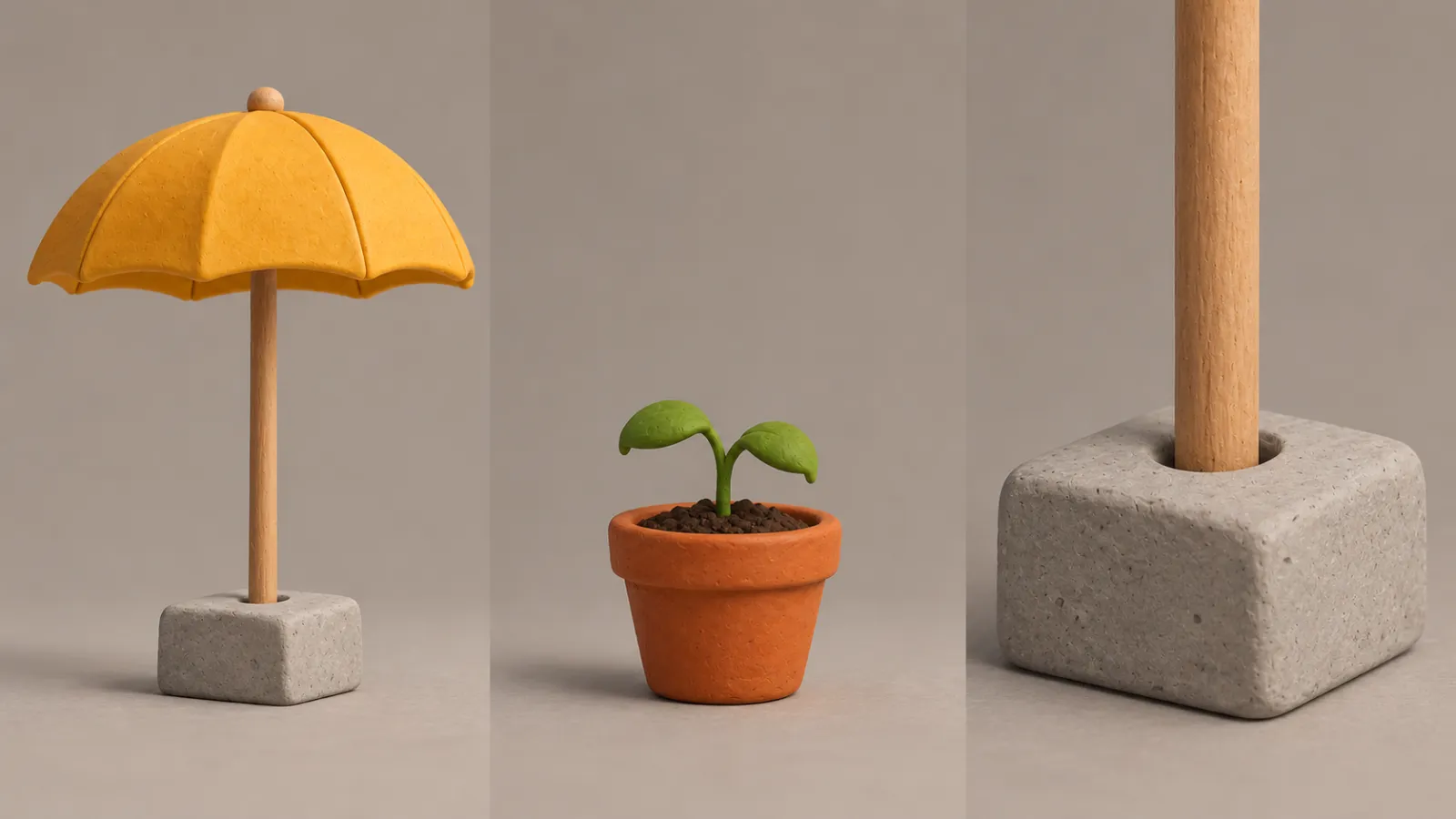
Caption: Prop design schematic, detailing each component’s role in supporting the umbrella, plant, and overall structure.
The stone pedestal must appear in the scene before the umbrella is set down; otherwise, there would be no explanation for why the umbrella stays upright after the character releases it, leaving both viewers and the generative model without sufficient context. Rather than adding a floating support later, it’s better to establish the structural relationship clearly from the outset .
Treat the entire piece as a single small set.
The rain-soaked alley features a wet stone pavement, gray-green walls, and an old turquoise wooden door. Flower pots and a stone pedestal stand beside the door, with no change in camera position between shots; rainfall and overcast diffused lighting remain consistent, without suddenly shifting to clear skies mid‑scene.
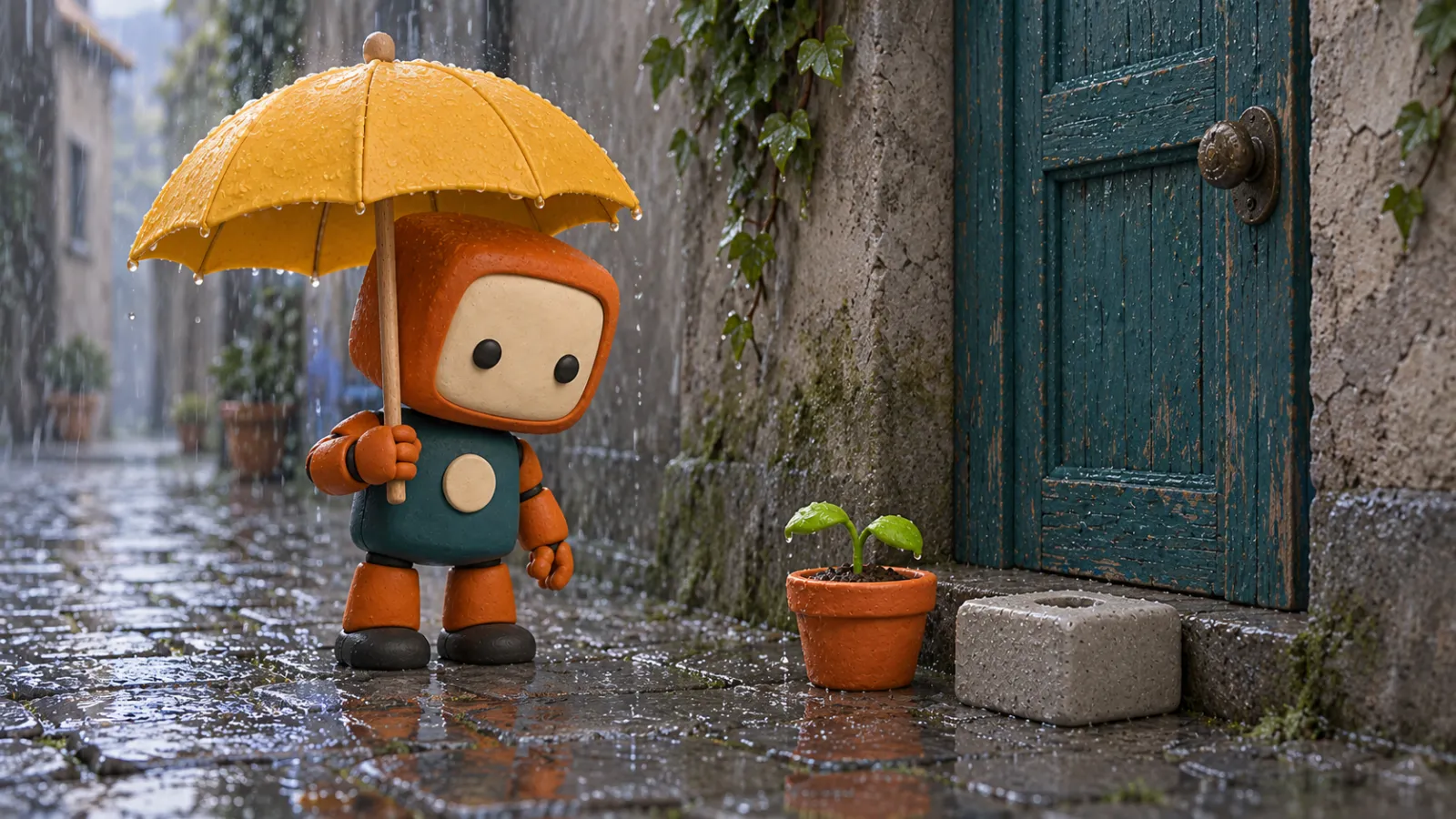
Caption: Concept art of the scene and initial state, showing the seedling not yet under the umbrella.
The visual style is unified as handcrafted clay‑like 3D animation: simple forms, subtly textured surfaces, and soft lighting. This description outlines the aesthetic approach but does not imply actual stop‑motion filming, nor should realistic metal or two‑dimensional watercolor elements be introduced in subsequent shots.
Telling “Borrowing a Sunny Day” in Five Shots
The following timecodes represent the editing plan. When generating, you may select durations supported by the current mode, leaving appropriate margins before and after actions, then fine-tune during editing; do not treat the seconds listed here as precisely verified execution results.
Shots and Timing | Visual Tasks | Shot Types and Actions | What to Preserve Before Moving to the Next Shot |
|---|---|---|---|
01, | Establishing the Situation | Midshot of the rainy alley: Lili walks with her umbrella toward the door, pauses upon noticing the flower pot | The umbrella remains in her hand, with the flower pot and stone pedestal clearly positioned |
02, | Allowing the audience to witness the discovery | Close-up of the seedling, with raindrops falling on its leaves and the rim of the pot | The seedling has not yet been obscured, and the rainfall intensity remains steady |
03, | Demonstrating the choice | Fixing a medium-close shot: Lili places the lower end of the umbrella pole into the circular hole of the stone pedestal | The umbrella pole is supported, and the seedling enters beneath the umbrella |
04, | Confirming the outcome of the action | Close-up of the hand and umbrella pole: Lili releases her grip and retracts her mechanical arm | The yellow umbrella remains in place, while the character has already let go |
05, | Emotional delivery | The low camera angle emphasizes the relationship between near and far: a young seedling stands beneath an umbrella, while Lili walks deeper into the alleyway | The umbrella and the seedling remain in the foreground, pausing briefly before concluding |
These five shots do not simply repeat the same action five times. The first two frames pose a question, the middle two complete the choice, and the final shot reveals the cost of that choice: the little seedling gains shelter, while the robot loses its own umbrella.
If placing and releasing are difficult to execute continuously, you can generate the two segments separately and then select a cut point where the contact relationship is clear. Do not assume that a single generation will perfectly capture the action just because it’s written down in the storyboard.
Prepare references in PixPix and generate according to each shot
First confirm the input mode, then assign the purpose of the reference
You can access the PixPix AI Image and Video Generator to explore options for generating images, importing references, and creating videos. Its public page showcases capabilities for producing images and videos from text or reference pictures; specific operational choices depend on your current workspace.
In this case, we divide the materials into three distinct purposes:
Character reference: fixes Lili’s face, body proportions, colors, and components.
Prop and scene reference: defines the yellow umbrella, flower pot, stone pedestal, and layout around the doorway.
Shot start frame: indicates who stands where at the beginning of this shot and who supports the umbrella.
Do not combine all three purposes into one sentence like “refer to these images.” If the current mode explicitly supports referencing, link materials through the interface and clearly specify responsibilities; if only initial frames are supported, first create a single image where characters, props, and composition have already been unified.
Build model candidates based on shot requirements
Below are the official capabilities introduced on PixPix’s website along with testing recommendations for this article—not rankings of animation effects, nor does it imply that every account offers exactly the same features.
Candidates | Official publicly listed related capabilities | Content this case can prioritize verifying |
|---|---|---|
MiniMax H3 | Multimodal input, creation driven by start and end frames and references, along with shot and motion descriptions | Whether Lili’s structure and umbrella‑holding action remain stable within a single shot |
Seedance 2.5 | Multimodal references, audio‑visual generation, video extension, and timestamp editing | Versions requiring sound or subsequent clip adjustments |
Kling 3.0 Omni | Multiple references, native audio, multi‑shot storyboards | When experimenting with multi‑shot organization, whether cutting and character usage are viable |
For corresponding explanations, see MiniMax H3、Seedance 2.5 and Kling 3.0 Omni。You don’t need to test all models at once the first time; you can start by selecting one available model and completing shot 03, which best exposes any issues.
First test placing the umbrella—there’s no rush to shoot the entire sequence in one go.
Shot 03 involves characters, props, occlusion, and support relationships simultaneously. If this shot still doesn’t work, adjust your shooting approach—for example, film only the umbrella pole near the stone base, then cut to the fully stabilized position.
Once this is approved, proceed to create the remaining shots. This way, you won’t discover at the very end that all the beautifully crafted scenes fail to connect with the most crucial moment of the story.
Write distinct prompts for each shot.
Shared settings: fixed appearance and artistic style.
The following settings apply to the relevant shots in this case. When clear references are already available, simply retain key unchanged elements instead of mechanically repeating entire sections each time.
Original little robot Lili: a rounded-square orange head, cream-white panels, two black round eyes, no mouth, a dark teal-green torso, a round off-white chest plate, short orange limbs, a three-fingered mechanical hand, and black round feet. Maintain consistent proportions and component counts throughout.
Handmade clay-textured 3D animation, featuring simple forms and soft overcast lighting. Wet cobblestone rain-soaked alleys, teal-green wooden doors; the same solid mustard-yellow round-topped umbrella with a straight wooden shaft, along with the same terracotta flower pot, two young seedlings, and a gray stone pedestal with circular holes. The scene’s space and materials remain continuous.
Shots 01 and 02: First identify potential issues.
In Shot 01, the main action focuses on pausing rather than rapidly showing the entire street.
Medium shot, one continuous take. Lili slowly walks toward the teal-green wooden door while holding an open yellow umbrella, stops upon seeing the flower pot beside the door, and looks down at the seedlings. The yellow umbrella remains firmly gripped by the mechanical hand, with the head-to-body proportions unchanged. Both the stone pedestal and the flower pot appear within the frame. The camera makes only slight panning movements, ending with a stable shot.
In Shot 02, shift the focus to the seedlings, preventing the protagonist from dominating the frame further.
Fixed close-up shot, featuring the same terracotta flower pot and the same two-leaf seedling. Raindrops fall onto the rim of the pot and the leaves, gently disturbing them without changing their overall position. The yellow umbrella has not yet been moved above the flower pot. The background retains the blurred color patches of the teal-green door panel, with lighting similar to the previous shot under overcast conditions.
Shots 03 and 04: Clearly capture the handover of support.
At the beginning of placing the umbrella, ensure that the umbrella pole, hole, and mechanical hand are easily identifiable. If key parts are obscured by the body, adjust the composition first.
Fixed medium-close shot, with Lili positioned by the door and the yellow umbrella already open. She holds the straight wooden shaft, slowly guiding its lower end into the circular hole of the gray stone pedestal next to the flower pot, positioning the umbrella canopy above the seedlings. The stone pedestal rests flat on the ground, and the umbrella pole halts its descent after entering the hole. The robot maintains its grip throughout, ensuring that the umbrella pole, mechanical hand, and stone pedestal are clearly visible at the end. All takes place in one continuous shot.
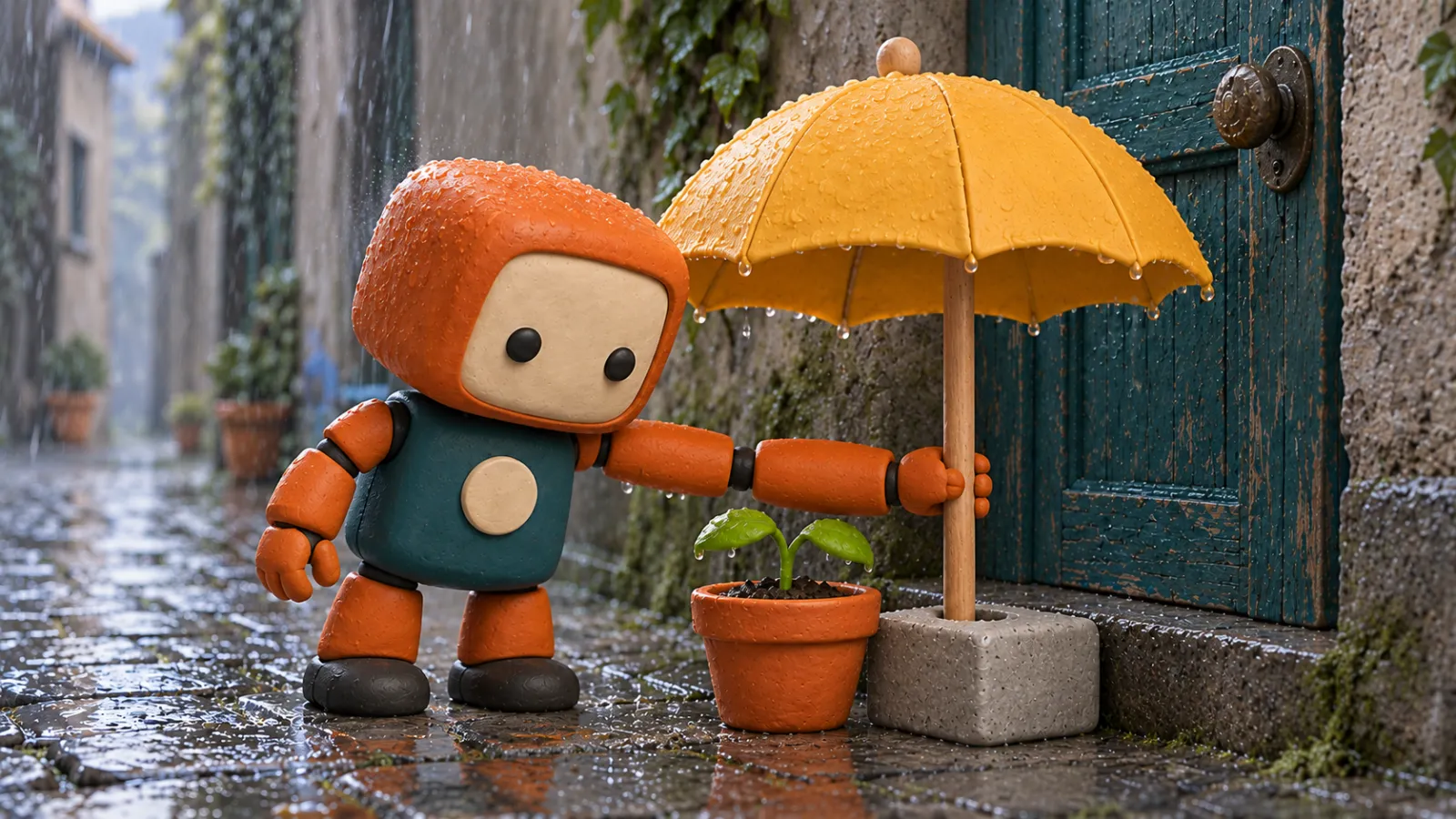
Caption: Conceptual diagram illustrating key action states; static images do not prove that inserting the pole or releasing the hand has actually occurred in the video.
In Shot 04, avoid repeating the insertion process—only show the result after releasing the hand.
Close-up of the mechanical hand and the umbrella pole. At the start, the umbrella pole is already securely inserted into the gray stone pedestal, and Lili’s three-fingered mechanical hand continues to hold the wooden shaft. She slowly releases her grip and withdraws her hand, leaving the umbrella pole and stone pedestal in their original positions, with the flower pot still beneath the yellow umbrella. The camera remains fixed, ensuring a clear separation between the mechanical hand and the umbrella pole at the end.
Shot 05: Let the visuals convey emotion.
There’s no need to suddenly give the robot a mouth, tears, or complex expressions. The umbrella in the foreground and the distant silhouette already effectively communicate the story’s progression.
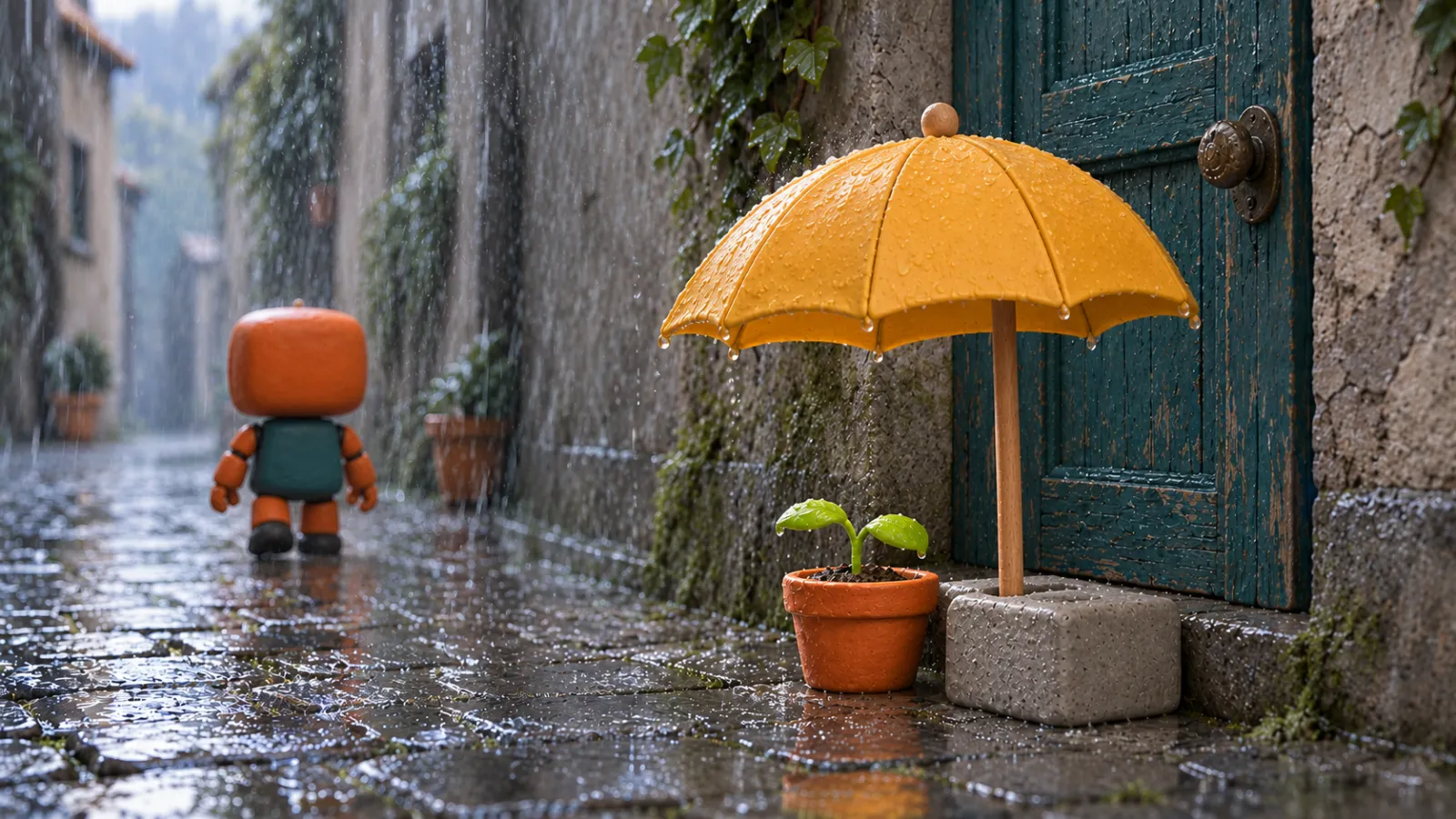
Caption: Conceptual diagram of the final composition, generated separately from other states—not a series of frames extracted from a continuous video.
Low camera angle, medium shot, same rain-soaked alley. In the foreground, a yellow umbrella by the doorway is fixed in a stone base, shading two young seedlings; Lili no longer has an umbrella and slowly walks along the established path toward the distance, her figure gradually shrinking. Her orange head shell, greenish body, and black feet remain unchanged, with proportions staying consistent. The rain continues to fall, with the foreground seedlings clearly visible and the distant robot’s silhouette discernible. At the end, there is a brief pause—no new characters are added, and no transition to clear weather occurs.
These texts are creative instructions awaiting testing. Clear descriptions help convey intent, but they do not guarantee that each generation will meet mechanical structure, motion trajectories, or inter‑shot consistency.
Editing, sound, and budget should all be reviewed within the same plan.
First verify the story using a rough cut, then add details later.
Export the usable clips first into your editing tool, arranging them in the order of five shots. Current publicly available information does not suffice to promise in this document that PixPix can automatically complete the entire timeline, mixing, and final export for this project; therefore, separate the generation of source material from the final editing process.
When reviewing, prioritize checking three key transitions: whether the close-up of the seedling connects smoothly to the robot placing the umbrella; whether the placement ends with the robot releasing its grip; and whether, after release, the scene transitions to the back view of someone without an umbrella. If the umbrella just disappears from the left hand only to reappear in the right hand in the next shot, fix this continuity issue first before discussing color grading.
This film requires no dialogue and avoids forced lip-syncing.
In this case, only rain sounds, footsteps, and the soft thud of the umbrella pole settling into the stone base are included. Sound should serve the action: footsteps appear when feet touch the ground, and the gentle thud emerges only when the wooden pole settles firmly—do not spread sound effects evenly across every shot.
If the current model supports and enables native audio, check the generated sound first; if it doesn’t support it or the result is unsuitable, supplement it during editing. Rain sounds should remain as continuous as possible between adjacent shots, becoming clearer when cutting to a close-up of the leaves—but avoid turning it into another heavy downpour for no apparent reason.
Estimate costs based on actual generation records.
Do not simply multiply “30 seconds per clip” by an unknown per-second rate. The finished clip length does not equal the total time submitted for generation. Each shot may retain editing room, and multiple revisions might be necessary.
Record for each task the model used, mode, input, duration, resolution, consumption displayed on the workstation, and the actual results achieved. Project generation consumption equals the sum of actual consumptions from all submitted tasks, including unadopted versions; images, edits, and sounds, if billed separately, should also be recorded individually. Prices that are not shown or confirmed should not be entered as part of the finalized budget.
Before delivery, answer these six questions frame by frame.
Without reading the text, can you understand that “the robot left the umbrella for the seedling”?
Are the five shots still featuring the same Lili? Have her eyes, chest, and mechanical arm changed?
Has the visual style consistently maintained the same handmade 3D aesthetic, with materials and the rain-soaked alley remaining continuous?
After the release, does the umbrella truly rest on the stone base rather than floating or passing through the ground?
Do the positions of the umbrella, flower pot, and character align properly, and does the sound correspond to the visible actions?
Does the final lingering shot give viewers enough time to process their choices, and do the subtitles and credits obscure any critical scenes?
If both landscape and portrait formats are required, check separately whether the protagonist, umbrella, and seedling remain simultaneously visible—do not simply center the landscape frame while cropping off both sides. Choose the aspect ratio according to the intended distribution and the specifications currently supported by your tools.
Frequently Asked Questions
Can I generate an entire animated short film with just one sentence?
A single sentence can help explore narrative directions, but ultimately each shot must still be checked for characters, actions, and transitions. Even if the mode supports multi-shot generation, it does not mean the overall pacing, sound design, or editing have been finalized.
Why do the visuals still change even when referencing the same character?
Reference is only part of the input. Changes in angle, occlusions, the model’s interpretation of materials, and random generation factors can all affect the outcome. You can reduce single-shot movements, improve key-angle references, and then review each shot individually; however, we cannot promise to lock down a character’s identity based solely on a name or a single prompt.
Is 3D animation necessarily more suitable for AI than 2D animation?
This article does not conduct a stylistic comparison. The choice depends on the story, artistic goals, and existing assets. In this case, handcrafted 3D was chosen to emphasize the umbrella, stone base, and body pose; if switched to 2D, the lines, proportions, and coloring rules would need to be redefined as well, rather than simply replacing one style term.
How many reference images are needed, and how long will it take to complete?
There is no one-size-fits-all answer. First, gather the essential materials that clearly define the characters, props, and setting, then supplement with additional elements based on specific shortcomings. Production time should account for storyboarding, art approvals, rendering waits, revisions, and editing; since video generation was not performed in this case, an actual timeline estimate is not provided.
Start production with the single most critical shot.
Prepare the reference for the chestnut, yellow umbrella, and stone base, then proceed. PixPix Video Workstation, First, verify the action of “placing the umbrella steadily.” Once this action is confirmed, then complete the shots showing discovery, releasing, and moving away.
Having five segments collectively tell the story of a single choice is a more suitable goal for this exercise than continually adding new characters, settings, or special effects. First, turn “Borrowing a Sunny Day” into a short, comprehensible story, then expand it into the next installment.

AI Image Tool Built for E-commerce Teams
For new product launches, advertising, and promotional campaigns, use AI to generate product images, scene visuals, ad creatives, and short video assets — making content production faster.